 AI Trends
Artificial Intelligence
Introducing Amazon SageMaker HyperPod Global Inference Gateway: One endpoint across Regions and clustersDuring a traffic peak, a request can sit in a queue on a saturated HyperPod cluster while GPUs on another cluster, sometimes in another AWS Region, sit idle. You have already paid for that capacity, but your requests can’t reach it.
In Introducing Amazon SageMaker HyperPod Inference Gateway, we showed how the Inference Gateway gives each Amazon SageMaker HyperPod cluster a single, GPU-aware endpoint. It reads real-time signals such as key-value (KV) cache utilization and queue depth to place every request on the best-suited pod. That solves routing inside one cluster, but not across clusters.
Today, SageMaker HyperPod introduces the Global Inference Gateway. It is one SageMaker-managed gateway that routes across every cluster you register, in one Region or across Regions. The gateway picks the cluster and carries the request over the AWS backbone, with automatic failover and authentication through AWS Signature Version 4 (SigV4) and AWS Identity and Access Management (IAM). Inside each cluster, the Inference Gateway keeps picking the pod, unchanged. The Global Inference Gateway is the second tier of the architecture we described in part 1.
The challenge: Capacity spread across clusters and Regions
Models are getting larger, and the GPU capacity to serve them is harder to find. To get enough of it, you spread it across more clusters and more Regions.
Consider a team that serves four models across five HyperPod clusters in two Regions. Without the Inference Gateway, clients track 20 endpoints: one per model per cluster. The Inference Gateway cuts that to five, one per cluster. But each client still picks a cluster itself.
That choice has costs:
- Uneven load. During peaks, requests queue in one Region while GPUs in the other Region are idle.
- Manual failover. When a cluster fails, an engineer changes configuration to move traffic away from it.
- Custom plumbing. Spreading traffic across Regions means building and maintaining load balancers, DNS, and cross-Region networking yourself.
The team needs one endpoint that sends each request to the best-suited cluster and moves traffic off a failed cluster on its own.
Key benefits
The Global Inference Gateway helps you get more from the GPU capacity you already have, with less to operate.
- Put idle GPUs to work. During a peak, requests overflow to clusters with available capacity in the same Region or another one, instead of queuing on a saturated cluster.
- Fail over automatically. When a cluster fails, the gateway moves its traffic to the next-best cluster. Clients don’t change anything.
- Use one endpoint for everything. Clients call a single SageMaker-managed endpoint instead of tracking one endpoint per cluster or per model.
- Skip the custom networking. You don’t build or maintain load balancers, DNS, or cross-Region networking.
- Stay private by default. Every request is authenticated with SigV4 and IAM, and it reaches your clusters only over AWS PrivateLink.
Customer feedback
“At Bagelcode, we run our own LLM inference service on AWS to help teams across the company, including our game teams, use AI to improve how they work. In our beta tests, the Global Inference Gateway in Amazon SageMaker HyperPod routed requests across two AWS Regions through a single endpoint and kept serving them when one cluster could no longer serve the model. That gave our small platform team cross-Region failover without having to build or maintain our own routing layer.”
— Jinhyung Park, VP (AI Platform), Bagelcode
How it works
Setting up the gateway takes two decisions: which clusters to open up for routing, and which of them to group behind one gateway.
- Publish a cluster. You do this once per cluster. You turn on the
spec.globalRoutingblock in the cluster’s existingInferenceGatewayConfig. The HyperPod Inference controller then publishes the cluster privately from your own account. - Create the gateway. You do this once per gateway. You call
CreateGlobalInferenceGatewaywith the clusters to route across, and SageMaker returns one endpoint.
A cluster is reachable only after you publish it. When you publish a cluster, the controller creates a Network Load Balancer in front of the cluster’s Inference Gateway, publishes a virtual private cloud (VPC) endpoint service on it, and uploads the listener’s certificate to your TLS bucket. These resources live in your account. If you list a cluster in a gateway before you publish it, the call fails with a message that tells you what to fix.
How a request flows
Figure 1 shows the path of each request: (1) your client signs the request with SigV4 and sends it to the gateway’s regional endpoint. (2) The gateway authenticates the caller and picks the best cluster. (3) AWS PrivateLink carries the request to that cluster, in the same Region or another, and (4) the cluster’s Inference Gateway routes it to a model pod, as it does today.
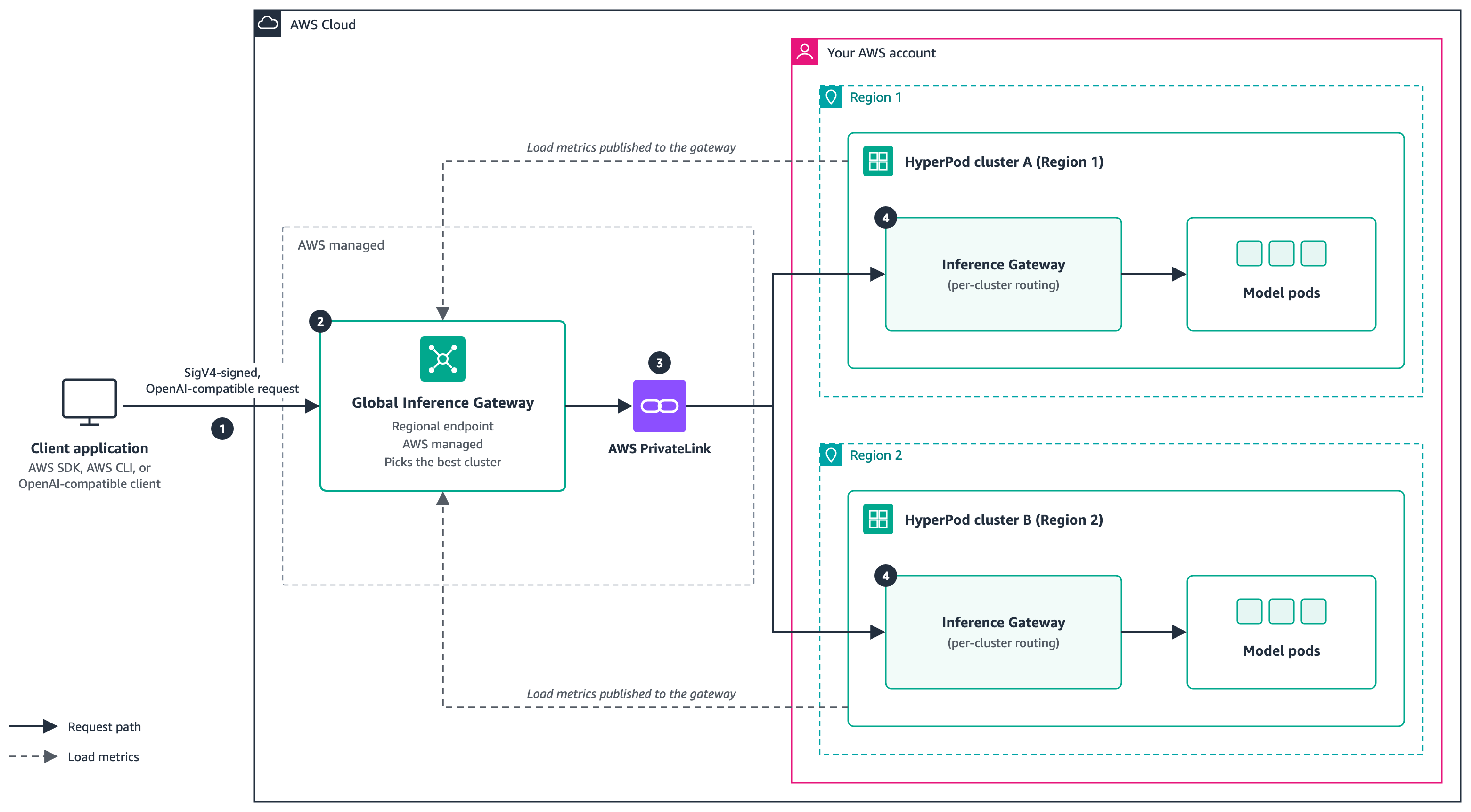
Figure 1: The Global Inference Gateway receives each request at one regional endpoint and forwards it over AWS PrivateLink to the best HyperPod cluster, where the cluster’s Inference Gateway routes it to a model pod. Each cluster publishes its load back to the gateway.
What AWS operates
You decide which clusters to publish, which to group behind a gateway, and how to weight routing. AWS operates the rest:
- The routing fleet. SageMaker provisions and operates the fleet that terminates TLS, authenticates callers, scores clusters, and forwards each request.
- Private connectivity. SageMaker creates one private endpoint per cluster and carries traffic on the AWS backbone, in-Region and cross-Region.
- Certificates and validation. Using an execution role that you create, the service reads each cluster’s VPC endpoint service name, certificate, and Region, so you don’t copy them by hand. It checks them before routing traffic.
- Health and failover. The gateway health-checks every cluster and moves traffic off a failed cluster automatically. For details, see the Operating the gateway section.
- Authentication and rate limits. The gateway checks SigV4 signatures, IAM permissions, and rate limits, and rejects failing requests before any cluster sees them.
On each cluster, a service-managed metrics publisher with its own IAM role sends the cluster’s load to the gateway.
How the gateway picks a cluster
For each request, the gateway scores every healthy cluster on four signals and sends the request to the highest-scoring cluster. Each cluster’s metrics publisher supplies the load signals.
You control how much each signal counts with routing weights. Each weight is a value from 0.0 to 1.0, and a weight of 0 turns that signal off. If you set weights, you set all four, and they must add up to 1.0. If you omit them, the defaults in the following table apply.
| Weight | What it scores | Default |
KVHeadroom |
Available KV cache and GPU memory on the cluster | 0.20 |
QueueDepth |
How backed up the cluster is | 0.25 |
RegionProximity |
Distance between the cluster and the gateway’s Region | 0.40 |
ErrorRate |
Recent failed requests on the cluster | 0.15 |
The defaults favor clusters close to the gateway’s Region, while still moving traffic toward clusters with available capacity and away from clusters that are failing. If resilience matters more than proximity for your workload, raise ErrorRate and lower RegionProximity. For example, the following routing block weights recent errors at 0.7:
{"Weights": {"KVHeadroom": 0.1, "QueueDepth": 0.1, "RegionProximity": 0.1, "ErrorRate": 0.7}}You pass the weights in the Routing parameter of CreateGlobalInferenceGateway, and you can change them later with UpdateGlobalInferenceGateway.
Choose your starting point
Your path depends on what you run today. If you serve from a single cluster, stay on that cluster’s Inference Gateway endpoint. Move to the Global Inference Gateway when you add a second cluster.
| Starting point | What you do | Result |
| The Inference Gateway runs on each cluster, for example four models on five clusters in us-east-1 and us-west-2 | Update the add-on, publish each cluster, and create the gateway | One endpoint for every cluster. Per-cluster endpoints keep serving while you move clients over. |
| The HyperPod Inference add-on runs with the Inference Gateway turned off | Turn on the Inference Gateway with one add-on update and one InferenceGatewayConfig per cluster, add a scheduler for each model, then follow the first row |
Per-model endpoints collapse into one |
| GPU capacity in two Regions, but no HyperPod Inference setup yet | Create a HyperPod cluster in each Region with the HyperPod Inference add-on, deploy your model, turn on the Inference Gateway, then follow the first row | One endpoint from day one, with traffic whose routing can be fine-tuned, and keeps serving if a Region has a problem |
Getting started
To set up the Global Inference Gateway, you prepare each cluster, create an execution role, and call CreateGlobalInferenceGateway. You then send OpenAI-compatible requests, signed with SigV4, to the gateway endpoint. For step-by-step instructions, including the IAM roles and policies, see the AWS documentation.
Security and access
Every request to the gateway is signed with SigV4 and authorized with IAM. Callers need permission to invoke the gateway, and streaming has its own action:
{
  "Version": "2012-10-17",
  "Statement": [{
    "Effect": "Allow",
    "Action": [
      "sagemaker:InvokeGlobalInferenceGateway",
      "sagemaker:InvokeGlobalInferenceGatewayWithResponseStream"
    ],
    "Resource": "arn:aws:sagemaker:<region>:<account-id>:global-inference-gateway/<gateway-id>"
  }]
}
Attach this policy to each IAM identity that sends requests. To allow every gateway in the account, use global-inference-gateway/* as the resource.
The execution role follows least privilege. It can describe only the clusters you list, reach only their Amazon Elastic Kubernetes Service (Amazon EKS) API, and read only the routing certificates under the gig/ prefix of your TLS bucket, tagged as created by HyperPod Inference.
Identity tokens. If your clusters check JSON Web Tokens (JWTs), pass the token with --customer-identity-token (the X-Amzn-SageMaker-Customer-Identity-Token header), with no Bearer prefix. The token travels inside the SigV4 signature, so an unsigned token is rejected with 403 and a repeated token with 400. Turn on JWT checks on every cluster that serves a model, or on none of them, so a request doesn’t succeed on one cluster and fail on another.
Requests reach your clusters only through AWS PrivateLink, as shown in Figure 1. The gateway does not log or store prompts or completions.
Operating the gateway
Here are steps to configure the gateway.
Add a cluster
Prepare the new cluster and create the execution role’s EKS access entry on it, as described in the documentation. Also add the new cluster to the Resource lists of the execution role’s permissions policy. Then call AddInferenceGateway in the gateway’s Region, even if the new cluster is in another Region:
aws sagemaker add-inference-gateway \
  --identifier <gateway-name> \
  --region <region> \
  --cluster-arn arn:aws:sagemaker:<region-3>:<account-id>:cluster/<cluster-id-3> \
  --name <gateway-config-name-3> \
  --namespace inference-gateway
The gateway validates the cluster and starts routing to it once it is healthy. The endpoint, other clusters, and clients aren’t affected.
Detach a cluster
Call RemoveInferenceGateway in the gateway’s Region:
aws sagemaker remove-inference-gateway \
  --identifier <gateway-name> \
  --region <region> \
  --cluster-arn arn:aws:sagemaker:<region-3>:<account-id>:cluster/<cluster-id-3> \
  --name <gateway-config-name-3> \
  --namespace inference-gateway
The gateway stops sending new requests to the cluster, lets in-flight requests finish, and removes the private endpoint. A gateway always keeps at least one cluster. To withdraw the cluster fully, set globalRouting.enabled: false in its InferenceGatewayConfig and reapply it.
Delete the gateway
Call DeleteGlobalInferenceGateway:
aws sagemaker delete-global-inference-gateway \
  --identifier <gateway-name> --region <region>
The gateway endpoint stops serving, and per-cluster endpoints keep serving. After the gateway is deleted, withdraw each cluster with globalRouting.enabled: false, then delete the execution role and the IAM permissions you added for global routing.
The following table summarizes how common events and changes affect traffic.
| Event | What happens | What you do |
| Gateway creation fails | The gateway moves to FAILED, and FailureReason says what failed, such as a certificate name mismatch |
Fix the cause. To see each cluster’s status, call ListInferenceGateways. |
| A cluster fails | Traffic moves to the next-best cluster, and the cluster returns gradually after it recovers. A failed request is retried once on another cluster unless it has started streaming. If no healthy cluster is left, the gateway returns 503. | Nothing. Clients don’t change anything. |
| Change routing weights | New requests use the new weights, and in-flight requests finish under the old ones. Nothing is re-provisioned. | Call UpdateGlobalInferenceGateway |
| Add a cluster | Routing starts once the cluster is healthy. Nothing else changes. | See Add a cluster |
| Detach a cluster | New requests stop, and in-flight requests finish | See Detach a cluster |
| Delete the gateway | The gateway endpoint stops serving, and per-cluster endpoints keep serving | See Delete the gateway |
For any troubleshooting assistance, please see the Troubleshooting Guide.
Best practices and considerations
- Plan your groups before you publish. Decide which clusters sit behind each gateway, with the same
modelNameon every cluster that should share a model’s traffic. If you want peak traffic to overflow across Regions, give clusters in both Regions headroom. - Publish only the clusters you add to a gateway. A published cluster that isn’t in any gateway receives no traffic, but its Network Load Balancer still runs and is billed.
- Cover every model. Each scheduler in the
InferenceGatewayConfigmaps a model name to the pods that serve it. A model that isn’t in any scheduler can’t be reached through the gateway, and requests for it return a 404 error. - Keep your add-on configuration complete. With
--resolve-conflicts OVERWRITE, an incomplete configuration can reset your load balancer or TLS settings. Start from the current configuration every time. - Pass
--contexton everykubectlcommand. You work across several clusters, so make sure each command runs against the cluster you mean. - Keep a workload in one Region when you need to. Create a gateway that includes only clusters in that Region.
Conclusion
In this post, we introduced the Amazon SageMaker HyperPod Global Inference Gateway: one SageMaker-managed endpoint across your HyperPod clusters, in one Region or several. The gateway picks the cluster based on KV cache headroom, queue depth, Region proximity, and error rate, and moves traffic off a failed cluster with no client changes.
The Global Inference Gateway is available in 13 AWS Regions: US East (N. Virginia), US East (Ohio), US West (N. California), US West (Oregon), South America (São Paulo), Europe (Frankfurt), Europe (Ireland), Europe (London), Europe (Stockholm), Asia Pacific (Tokyo), Asia Pacific (Mumbai), Asia Pacific (Singapore), and Asia Pacific (Sydney).
To get started, see the AWS documentation.