 AI Trends
October was a heavy month for security teams. 17,050 new CVEs were published, about 550 a day. That's nearly four times as many as in October 2025, and the most of any month on record. Vulnerabilities are popping up faster than ever, and triaging them quickly is hard for teams of any size.
And yet, the backlog is often very routine. A version bump here, an image rebuild there. Most of the time you’re just staying on top of patch versions and then confirming nothing has broken.
These days, I think about AI at work in roughly three flavors:
-
Piloting: We’re all doing this for much of our day now. Jamming out in the CLI or app of your choice and churning out changes.
-
Reporting: Asking or automating the condensing of information into a message, email or dashboard. Reading logs, interpreting metrics, etc.
-
Offloading: Truly giving the entire capability for a task to an agent, with as little human thought or involvement as possible.
Offloading feels the least common, and that’s where we’re spending a lot of time experimenting at OpenHands. CVE remediation is just one example of many common engineering tasks that seem ideal for higher agent control. I truly believe that at least 80% of CVE remediation work can be handled by autonomous agents, with people reviewing only particular changes and making the calls that need judgment.
At OpenHands, we have handed over the majority of our remediation efforts to agent workflows: an agent picks the fixes, opens the PRs, merges the low-risk ones and tracks each fix until it's deployed. We read one Slack message a day and review a few PRs. We open-sourced this workflow when we launched OpenHands Teams, and you can try it yourself below. This post will dive a bit deeper into the components and design of this workflow and may help anyone reading get an automated CVE remediation pipeline up and running in no time!
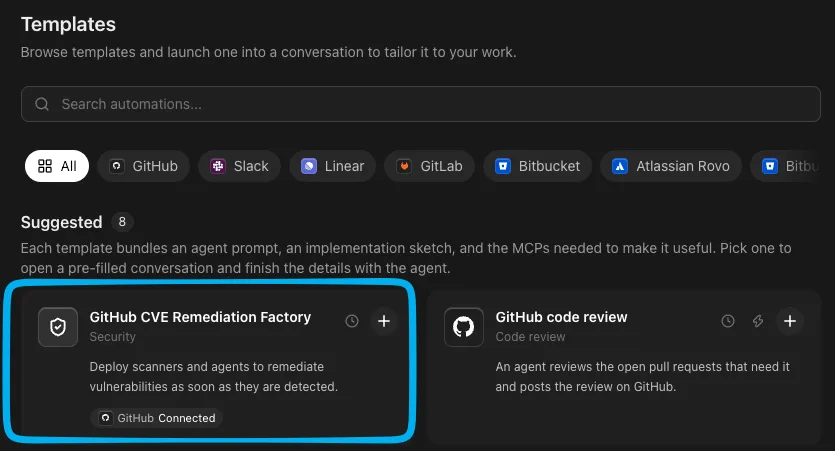
If you just want to see this working on your own stack, everything in this post is now available as an automation template: download OpenHands, create an account, find the GitHub CVE Remediation Factory template and go from there!
Why CVEs are a good job for an agent
Lots of engineering work is hard to grade. Was the refactor better? Is the doc clearer? People can argue either way.
CVE remediation, however, leaves little room for argument. With a scanning pipeline in place, you see vulnerabilities when they are reported and then they disappear after a fix ships. If the count went down and nothing broke, the work was good. In a world where we are all scrambling to decide how, exactly, to measure the quality of AI output, I was very excited to have an unassailable mechanism by which to judge results. Let's dive into what we built. I'll cover the approach we took and offer some general advice for the many ways software gets built and delivered.
Step 1: Know what you ship
You need a comprehensive picture of your deliverables in order to populate an accurate list of vulnerability scanning targets. For OpenHands, before any agent runs, we needed an inventory of every image we deploy, including third-party ones like Redis or Keycloak.
Don't keep this list by hand. It goes stale the first time someone adds a service or new dependency. We generate ours on every vulnerability scan. Since OpenHands can be deployed into Kubernetes environments, we already have Helm charts that capture every image that our customers might be bringing along. A script checks out our Helm charts at the latest release tags, renders them with every optional component turned on, collects every image that could possibly be deployed, and then passes those into our scanning pipeline.
The Helm chart is a handy catchall for us, and it's a good starting point for any Kubernetes shop. Elsewhere, the inventory might come from:
-
Your production repos. Scan the lockfiles, Dockerfiles and manifests in every repo that ships to production.
-
Your container registry. Amazon ECR, Google Artifact Registry and the like hold every image you've pushed.
-
Your package proxy. An internal Artifactory or Nexus shows which Maven, npm or PyPI packages your builds actually pull.
-
Whatever is running right now. Listing the images on your live clusters or ECS services catches anything that never made it into a repo or chart.
Step 2: Scan with at least two tools
We scan every image with both Trivy and Grype. They use different vulnerability data and look in different places, so each catches things the other misses. For example, here's what they found on two old public images, redis:6.0.5 and python:3.9.0-slim, on November 17. Trivy reported 630 vulnerabilities and Grype reported 743, but only 462 showed up in both. Together they found 911 different ones:
| Findings | Example | Where it lives | |
|---|---|---|---|
| Both tools | 462 | CVE-2021-3520 (critical) in liblz4 | Debian system packages |
| Trivy only | 168 | CVE-2021-44716 (high) in Go 1.13.10 | Go code compiled into Redis's gosu helper |
| Grype only | 281 | CVE-2021-32762 (high) in redis-server 6.0.5 | Redis and Python themselves, plus Debian advisories only Grype's data has |
These differences can be sneaky, and it comes down to understanding their blind spots. For example, Grype can identify packages that weren’t installed through a package manager and therefore captured 36 findings in the Redis image. Trivy reads version information from Go programs and detected vulnerabilities in the bundled Go version in Redis’s gosu helper. Every vulnerability tool will have blind spots that other tools might cover.
The scan runs daily in GitHub Actions and commits its results to a scan-results branch: one summary per image, every finding with the version that fixes it, and a daily snapshot for trends.
Step 3: Decide who reads what
This is probably the most important decision in the whole process. Security teams are already buried in information, both human and AI-generated, so we decided up front exactly what people would look at and what they would never look at. Dashboards, charts and tables of vulnerabilities have their place, but in a month like October you just need to see the numbers go down, quickly and safely. So nobody at OpenHands reads the raw scan output from this pipeline. It's thousands of lines of JSON, organized specifically for agent consumption.
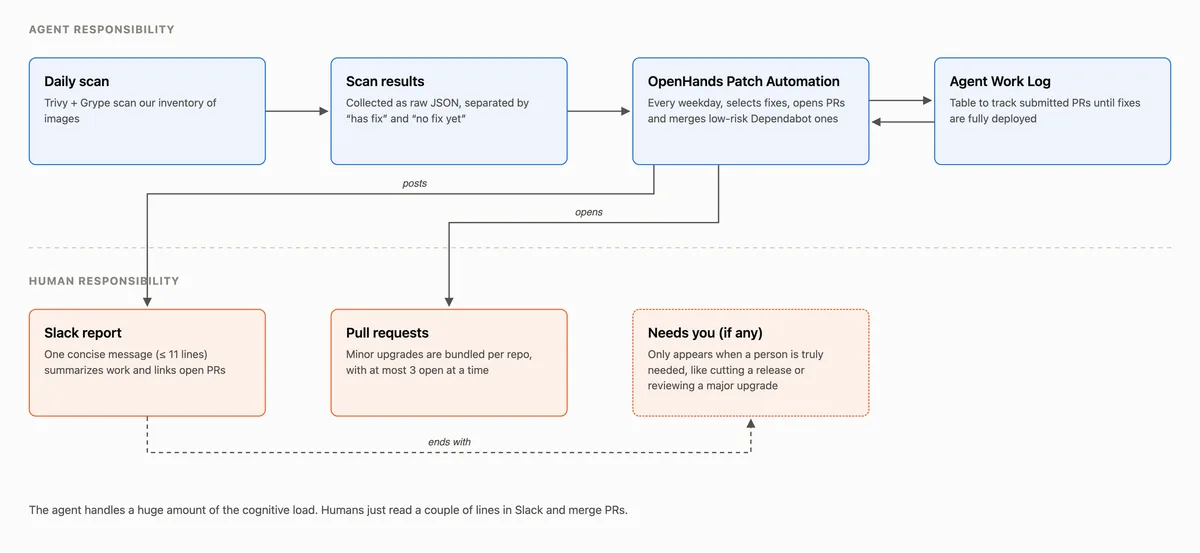
Each day, people read just two things: one Slack message and up to 3 PRs. I have found that reduced cognitive load results directly from having a constrained workload (once per day) and a constrained Slack message (11 lines max). This really is a game changer for truly automating this workflow and allowing me and my teammates to focus on more important tasks. You could absolutely open up a Claude Code session, jam out for a few hours, and submit 50 PRs to address vulnerabilities. But what about next month, and the month after that?
Once all is said and done, this is all we see each day, in the form of a Slack message:
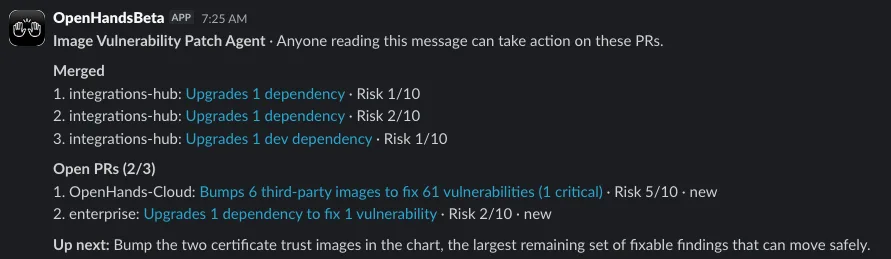
The message may sometimes end with a short “Needs you” tagline. It’s the agent’s best guess at what might need human input, like cutting a release or merging a chart bump that has been waiting for weeks, and acting on it is optional.
Step 4: Write the automation prompt
The agent is an OpenHands automation that runs every weekday from one prompt. It follows a pretty simple, constrained heuristic that is providing very consistent results:
-
Start by reading in:
-
Scan results
-
The work log: a markdown file with a table of PRs in-flight or merged and which CVEs they remediate
-
Any Slack replies or human comments on PRs in the past 15 days, to influence behavior
-
Read through the scan results, along with the context above, and simply pick a few changes that would remediate the most Critical/High CVEs with the least risk
-
Keep at most 3 of its own PRs open at once, assign a risk score to each and put that in its work log
-
Post a Slack message with a summary and links to PRs
In addition to the constraints, the concept of a work log is not a new one, but is especially helpful for agentic workflows owning a capability on their own. Since each run starts in a fresh sandbox, we needed a good, self-cleaning way for the agent to manage the work stream. It simply maintains a table that contains PRs until the CVE the PR claims to address has actually fallen off the latest scan results, at which point it is removed.

A few more rules were particularly helpful in keeping the cognitive load low:
-
Merge the easy ones directly. We already have Dependabot opening upgrade PRs. The agent merges up to 3 per run when checks pass and its risk score is low.
-
Bundle. One PR per repo with multiple minor and patch upgrades. Majors get their own PR, so the bundles can merge quickly without a deep review.
-
Take no for an answer. If a person closes a PR without merging it, the agent records that in the work log and won't open it again.
-
Use a bot account. Every commit and PR comes from a machine user. This means that you only need one more human in the loop instead of one to submit the PR and one to review. This also allows for a better audit trail on agent performance and throughput.
Where people still come in
People then come in to handle the rest, the work that may need judgment:
-
Major upgrades with breaking changes the agent can't rule out.
-
Real vulnerabilities: findings with no released fix, or where the question is whether our code is actually exploitable.
-
Shipping. A merged fix doesn't protect anyone until a release goes out and the chart picks it up. What a “release” means is different for every org, so determining a definition of done for CVE remediation is something that agentic automations can assist with.
How it's going
Since we started this process last month, fixable critical vulnerabilities in the images we build have dropped from a peak of 87 to 5, and fixable high vulnerabilities from 1,997 to 188. Across everything we ship, including third-party images, fixable critical and high findings are down by half.
What's next
We're evaluating every day how much of this work can be safely handed to AI automations. If you want to get started on your own stack, download OpenHands, create an account, and set up the GitHub CVE Remediation Factory template.
Want to see it built live? Join our technical webinar on December 8, where we build a CVE remediation workflow with OpenHands, from a vulnerable dependency to a pull request ready for review. Save your spot →
Ready to get started? Try OpenHands Teams free for 30 days.
Inside our CVE software factory: how OpenHands patches its own images
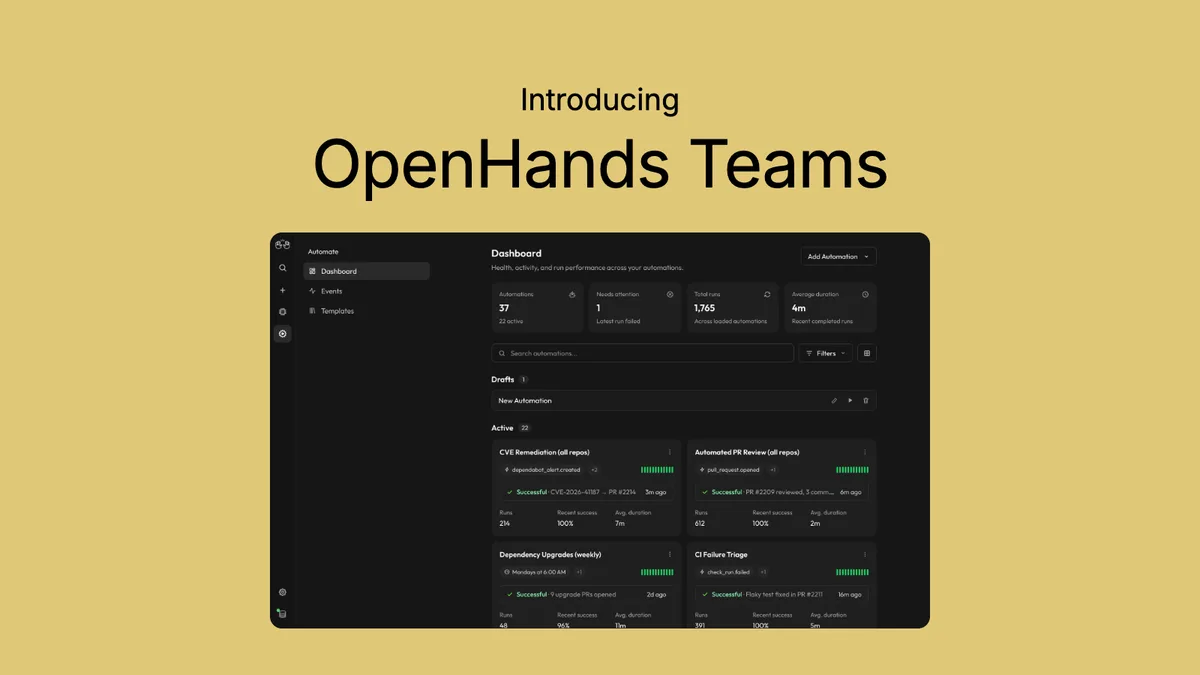
Introducing OpenHands Teams: Build Automated Engineering Workflows Without the Enterprise Barrier
Stop Choosing Coding Models by Hand
Get useful insights in our blogInsights and updates from the OpenHands team
Sign up for our newsletter for updates, events, and community insights.
Thank you for your submission!
Building the open standard for autonomous software development.OpenHands is the foundation for secure, transparent, model-agnostic coding agents - empowering every software team to build faster with full control.
Join The CommunityJoin The Community© 2026 OpenHands - All rights reservedPrivacy PolicyContact


