 AI 热点
 Nov 19, 2026
By Ryan Prout, Casey Dugas and Jason Davis
Discuss (0)
AI-Generated Summary
- NVIDIA Mission Control connects IT and OT systems to coordinate leak responses and monitor compute and facility conditions in liquid-cooled AI factories.
- The software provides configurable MQTT integration with building management systems, leak action policies mapped to the physical data center hierarchy, rack management commands for monitoring electrical, cooling, and leak detection systems, and observability integration with Prometheus and Grafana dashboards.
- Leak action policies define automated responses based on leak location and affected device count, with preconfigured templates for device, rack, row, room, and building scopes that coordinate actions across BMCs, the cluster manager, and the BMS.
- Rack mode commands such as electricaloverview, liquidcoolingoverview, leakdetectionoverview, and leakinfo bring together data from liquid-cooled infrastructure to monitor conditions and support incident investigation.
Next Steps
- Watch the NVIDIA Mission Control demo video to see the BMS integration in action.
- Review the Mission Control Integration with Building Management System Guide for prerequisites and implementation steps.
Managing AI infrastructure such as NVIDIA Vera Rubin NVL72 requires coordinated operation of compute, power, and cooling systems. In liquid-cooled AI factories, a leak response may require operational teams to stop workloads, isolate affected nodes, and control power circuits and cooling valves.
AI factory operations span two domains that have historically operated separately. Information technology (IT) teams manage compute resources, workload orchestration, and application performance. Operational technology (OT) teams handle physical building systems—power distribution, cooling infrastructure, and environmental safety. This post explains how NVIDIA Mission Control connects IT and OT systems to coordinate leak responses and monitor compute and facility conditions.
IT and OT convergence in liquid-cooled environments
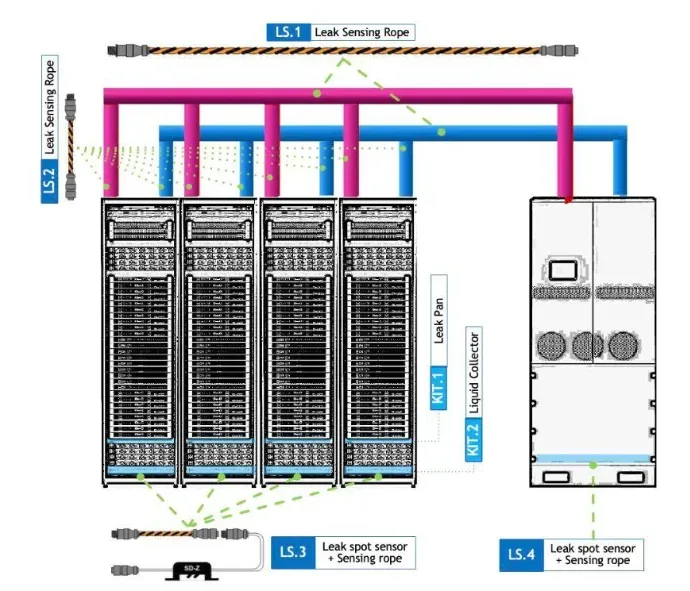
Liquid cooling creates interdependencies between IT and OT systems that require coordinated responses. When a leak sensor triggers, IT systems may need to stop workloads and isolate affected compute nodes, while a building management system (BMS) manages power circuits and cooling valves. The response sequence depends on the configured policies and facility requirements. The challenge is coordinating these actions across systems quickly and reliably. Figure 1 shows the leak detection components around the racks and coolant distribution unit.
Liquid-cooled systems can handle higher thermal loads per rack than air-cooled equivalents, supporting higher rack power densities. Teams integrating AI systems with building infrastructure must consider six operational requirements:
- Protocol compatibility
- Safety and regulatory compliance
- Response times
- Unified visibility into compute health and facility status
- Scalability
- Coordination across operational teams
Addressing these requirements helps when coordinating compliance activities, improving response times, and sharing operational data. Custom integrations that support real-time communication and actionable insights can be difficult to maintain as deployments grow.
Flexible configuration for enterprise AI factories
When building liquid-cooled NVIDIA DGX SuperPOD clusters for production, the NVIDIA team tested tighter integration with building management systems by adding connections and policies to the cluster management software. A common integration framework provides standardized interfaces for IT and OT systems, supports communication across vendor ecosystems, and provides configurable policies for different organizations’ operational requirements. These integrations must also preserve the security boundaries required by both domains.
NVIDIA Mission Control, a software stack for AI factory operations and orchestration, provides this integration for enterprises deploying NVIDIA GB200 NVL72 and NVIDIA GB300 NVL72 systems. Standardized integration helps teams reuse operational knowledge about liquid-cooled infrastructure instead of developing each connection independently.
NVIDIA Mission Control provides four configuration and monitoring capabilities:
- Configurable MQTT integration with building management systems
- Configurable leak action policies
- Rack management commands for monitoring electrical, cooling, and leak detection systems
- Observability integration with Prometheus and dashboards for monitoring compute and facility metrics
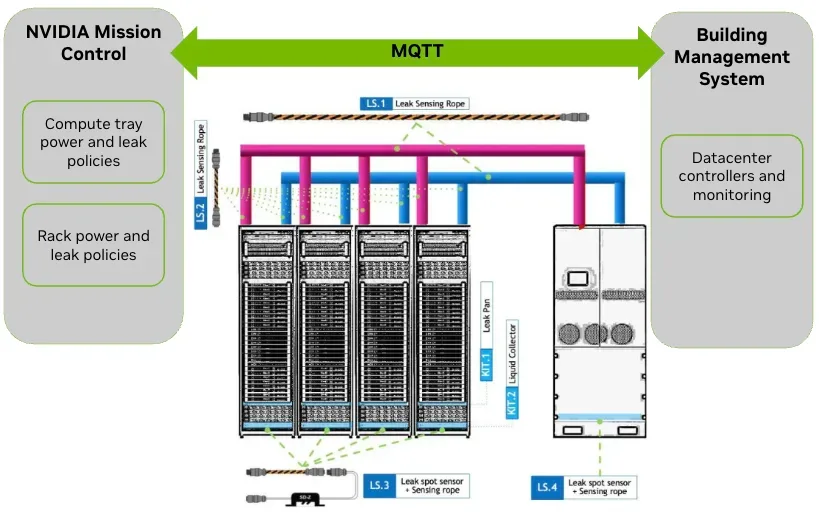
Teams can configure these capabilities through NVIDIA Base Command Manager, the cluster management software in NVIDIA Mission Control. Figure 2 shows how MQTT connects NVIDIA Mission Control and the BMS.
Configurable MQTT for BMS integration
NVIDIA Mission Control integrates with building management systems through MQTT, a lightweight messaging protocol used in industrial internet of things (IoT) and building automation systems. The NVIDIA Base Command Manager command-line interface, cmsh, supports MQTT broker connections, authentication configuration, and selection of facility data streams for AI factory operations.
The following commands display the existing MQTT role configuration, including certificate paths and configured servers:
[a08-u04-p01-bcm-01]% configurationoverlay
[a08-u04-p01-bcm-01->configurationoverlay]% use mqtt
[a08-u04-p01-bcm-01->configurationoverlay[mqtt]]% roles
[a08-u04-p01-bcm-01->configurationoverlay[mqtt]->roles]% use mqtt
[a08-u04-p01-bcm-01->configurationoverlay[mqtt]->roles[mqtt]]% show
Parameter                        Value
-------------------------------- ---------------------------------------------------------------------------------
Name                             mqtt
Revision
Type                             MQTTRole
Add services                     yes
Servers                          <1 in submode>
CA certificate path              /cm/local/apps/cmd/pythoncm/lib/python3.12/site-packages/pythoncm/etc/cacert.pem
Private key path                 /cm/local/apps/cmd/cm-mqtt/etc/mqtt.key
Certificate path                 /cm/local/apps/cmd/cm-mqtt/etc/mqtt.pem
Write named pipe path            /var/spool/cmd/mqtt.pipe
The following commands list the configured MQTT servers and display the connection settings for mqtt-bcm-client:
[a08-u04-p01-bcm-01->configurationoverlay[mqtt]->roles[mqtt]% servers
[a08-u04-p01-bcm-01->configurationoverlay[mqtt]->roles[mqtt]->servers]% ls
Server (key)     Port       Disabled
---------------- ---------- ----------
mqtt-bcm-client   1883       no
[a08-u04-p01-bcm-01->configurationoverlay[mqtt]->roles[mqtt]->servers]% use mqtt-bcm-client
[a08-u04-p01-bcm-01->configurationoverlay[mqtt]->roles[mqtt]->servers[mqtt-bcm-client]]% show
Parameter                        Value
-------------------------------- ------------------------------------------------
Revision
Server                           <IP Address>
Port                             1883
Topic                            BCM/#
Disabled                         no
Username                         BCM
Password                         ********
Transport                        tcp
Protocol                         v3.1.1
Certificate required             yes
Check hostname                   yes
Configurable leak action policies
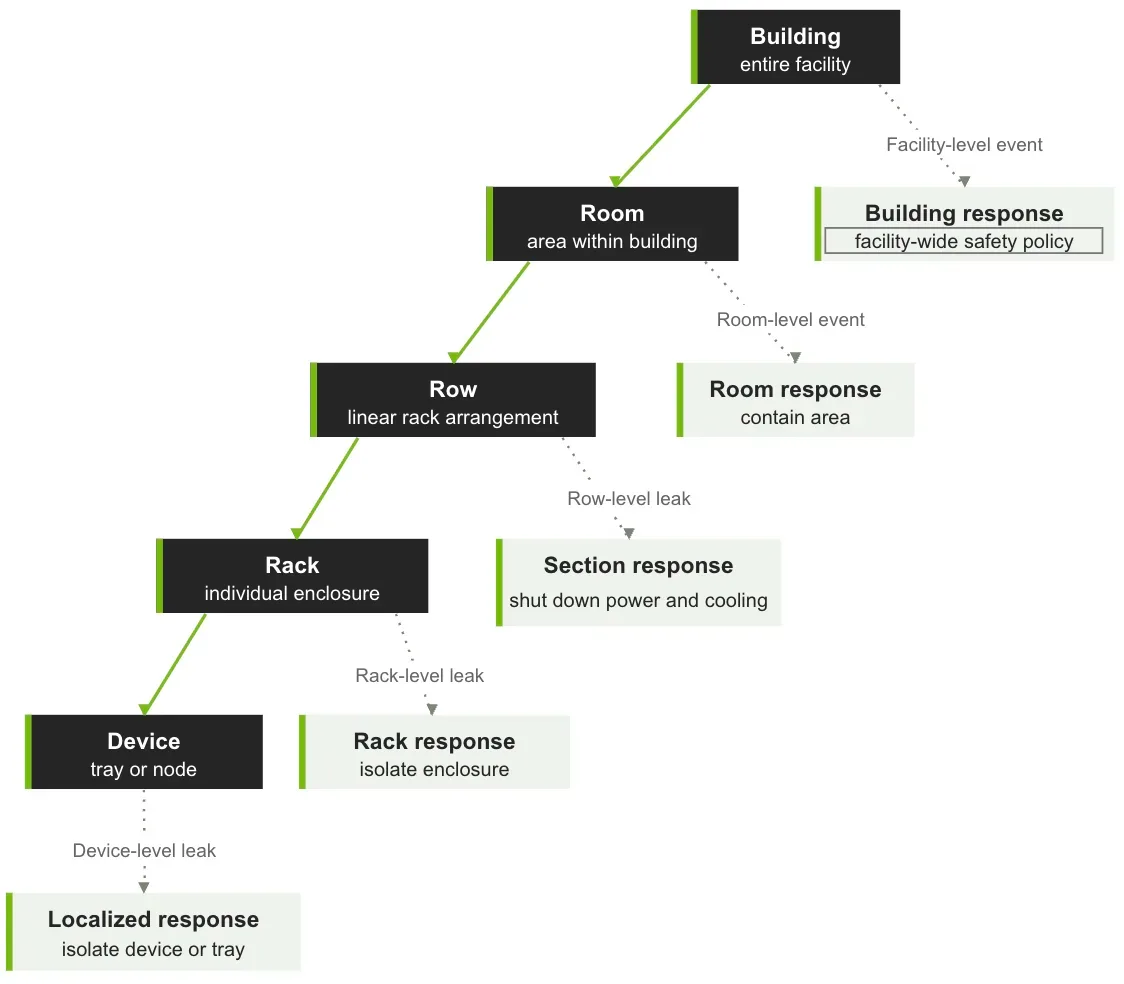
A leak detected in a single compute tray requires a different response from a leak affecting an entire row of racks. NVIDIA Mission Control uses leak action policies to define responses based on the leak location and the number of affected systems.
The policy structure follows the physical data center hierarchy: building, room, row, rack, and device. For example, teams can configure a policy to isolate and power down a tray when one device reports a leak. A broader policy could shut down power and cooling to a row and notify the BMS to close facility-level valves when three or more racks in that row detect leaks. The system executes the configured responses automatically. Figure 3 shows how policies map to the physical hierarchy.
NVIDIA Mission Control includes preconfigured policies for device, rack, row, room, and building scenarios. Teams can use these templates as provided or customize them to meet operational requirements. The following commands list the available policies:
[a08-u04-p01-bcm-01->partition[base]]% leakactionpolicies
[a08-u04-p01-bcm-01->partition[base]->leakactionpolicies]% ls
Name (key)               Rules
------------------------ ----------------------------------
Default building policy  Building, Device, Rack, Room, Row
Default device policy    Device
Default rack policy      Device, Rack
Default room policy      Device, Rack, Room, Row
Default row policy       Device, Rack, Row
The following commands display the rules in the default building policy:
[a08-u04-p01-bcm-01->partition[base]->leakactionpolicies]% use "Default building policy"
[a08-u04-p01-bcm-01->partition[base]->leakactionpolicies[Default building policy]]% rules
[a08-u04-p01-bcm-01->partition[base]->leakactionpolicies[Default building policy]->rules]% ls
Name (key)       Scope        Power off        Power off rack   Electrical isolation   Liquid isolation
---------------- ------------ ---------------- ---------------- ---------------------- ------------------
Building         building     yes              yes              no                     no
Device           device       yes              no               no                     no
Rack             rack         yes              yes              yes                    yes
Room             room         yes              yes              no                     no
Row              row          yes              yes              no                     no
Each rule includes parameters that control automated responses:
- Scope: The hierarchical level (building, room, row, rack, or device)
- Power off: Whether to cut power to the affected scope
- Electrical isolation: Whether to electrically isolate the affected area
- Liquid isolation: Whether to close valves to isolate the affected area
- Minimal devices: The minimum number of affected devices required to trigger the rule
- Maximal devices: The maximum number of affected devices for which the rule applies
These policies coordinate actions across the baseboard management controller (BMC), cluster manager, and BMS to automate responses at the configured scope. NVIDIA Mission Control tracks current leak events, historical incidents, and automated actions. Teams can access this information through command-line tools or the Base View user interface in NVIDIA Base Command Manager. The data is also exported as Prometheus metrics for integration with existing monitoring systems.
How to use advanced rack management commands
NVIDIA Mission Control provides rack mode commands to inspect power consumption, cooling performance, and leak detection status. These commands bring together data from liquid-cooled infrastructure to monitor conditions across racks and facilities.
electricaloverviewreports power consumption, power budget allocation, and electrical isolation status at the cluster or rack levelliquidcoolingoverviewreports supply and return temperatures, flow rates, differential pressure, and liquid isolation status at the cluster or rack levelleakdetectionoverviewreports leak sensor status from the BMC and BMS, isolation requests, electrical and liquid isolation status, and sensor faults at the cluster or rack levelleakinforeports current and historical leak events, including hostname, timestamp, severity, and event details, at the cluster or rack level
Teams can specify a rack to inspect its status, or run the command without parameters to view status across the cluster. Historical leak events available through leakinfo can support incident investigation, pattern analysis, assessment of sensor behavior, and audit documentation.
The following example uses leakinfo to query historical leak events:
[a08-u04-p01-bcm-01->device]% leakinfo --history 10
Hostname            Timestamp            Severity    Info
------------------- -------------------- ----------- -----------------
a04-p01-dgx-04-c11  2026/02/24 01:02:35  critical    Chassis_0_LeakDetector_0_ColdPlate` has changed to Critical..
a05-p01-dgx-03-c05  2026/03/28 21:29:24  critical    Chassis_0_LeakDetector_0_ColdPlate` has changed to Critical..
Observability integration
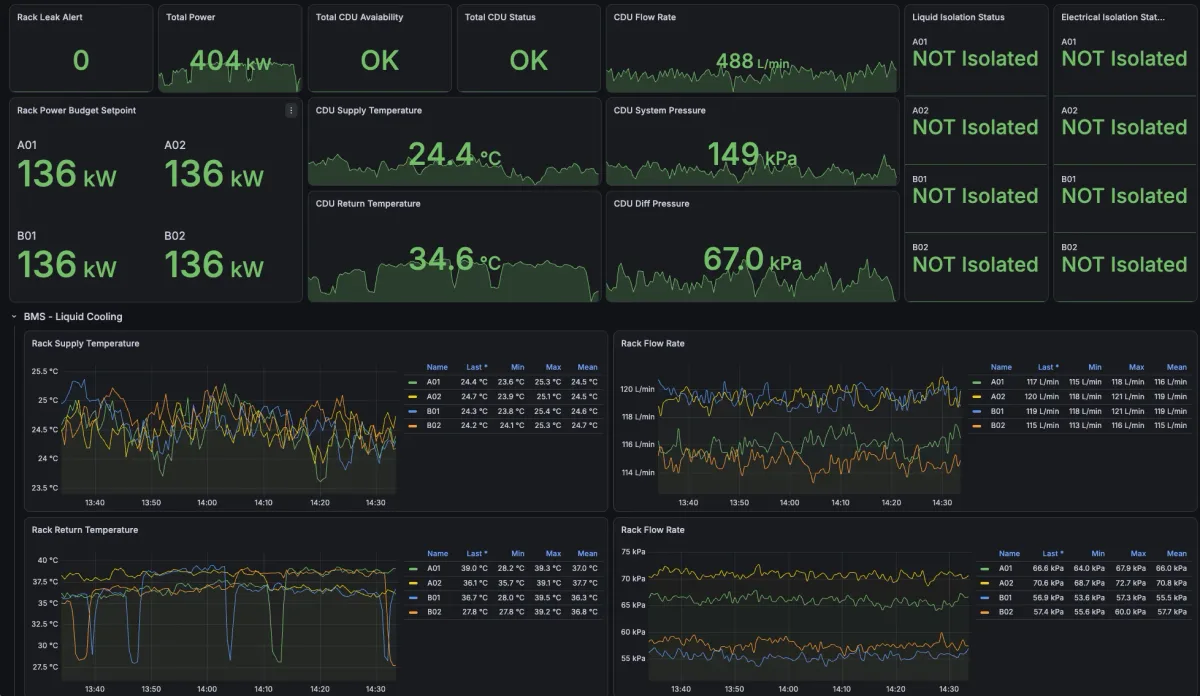
These monitoring capabilities integrate with the NVIDIA Mission Control observability stack to provide visibility across the cluster and facility. NVIDIA Mission Control exposes the monitoring data used by its command-line tools through Prometheus endpoints, supporting prebuilt Grafana dashboards, custom dashboards, alerting rules, and integration with existing monitoring workflows and tools.
Table 1 summarizes metric categories and data points to consider when building custom dashboards and alerts. Figure 4 shows a Grafana dashboard for rack cooling metrics.
| Metric category | Key data points | Operational value |
|---|---|---|
| Cooling performance | Supply and return temperatures, flow rates, differential pressure | Validate thermal management and assess cooling capacity constraints |
| Power management | Circuit loads, power shelf status, rack power consumption versus budget | Identify overload risks, optimize power distribution, and plan expansion |
| Leak detection | Sensor status (tray/rack/facility), isolation requests, historical events | Support incident response, sensor validation, and compliance documentation |
| CDU health | Operational status, system pressure, uptime metrics | Support proactive maintenance and identify signs of degradation |
| Isolation status | Electrical and liquid isolation state per rack/row | Verify isolation state, track incidents, and coordinate recovery |
Get started with planning for liquid-cooled AI factories
NVIDIA Mission Control integrates IT and OT systems through MQTT and configurable leak action policies to coordinate responses across trays, racks, and facilities. Shared monitoring data supports visibility into compute health and facility conditions.
Watch the demo video to see the integration in action.
For prerequisites and implementation steps, see the NVIDIA Mission Control Integration with Building Management System Guide.
Discuss (0)Tags
AI Platforms/Deployment | Data Center / Cloud | General | Base Command | Blackwell | DGX | Intermediate Technical | TutorialAbout the Authors
 About Ryan Prout
Ryan Prout is a senior product architect focusing on HPC and AI platform development for NVIDIA DGX rack-scale systems. Earlier in his career, he was an HPC Engineer and Engineering Manager at Oak Ridge National Lab, working on supercomputing systems and the larger integration of the scientific computing ecosystem. He has an educational background in Computer Science. View all posts by Ryan Prout
 About Casey Dugas
Casey leads product marketing efforts for NVIDIA’s infrastructure management software which includes NVIDIA Mission Control, Base Command Manager, and open-source Slurm. She joined NVIDIA in 2024. Prior to NVIDIA, Casey’s background includes various marketing roles supporting compute systems for various use cases including private cloud, virtualization, and edge AI. She has a business degree from the University of Louisiana at Lafayette and an MBA in marketing data analytics from Colorado State University. View all posts by Casey Dugas
 About Jason Davis
Jason Davis is a senior product architect at NVIDIA, focusing on infrastructure automation and observability for NVIDIA DGX rack-scale systems. He began his career at Dell at age 18, building broad experience in HPC, storage, observability, automation, data engineering, and capacity management. View all posts by Jason Davis