 AI 热点
Artificial Intelligence
Cut generative AI costs: Code for rules, models for judgmentThe biggest cost lever in a generative AI system is whether you call a model at all. We often see teams route every task through a large language model (LLM), including input validation, formatting, and routing. Each call is cheap in isolation, but at production scale these small costs become one of the largest line items in the architecture. Wherever a deterministic rule can do the job, skipping the model saves money, cuts latency, and removes a source of non-determinism. In this post, you learn how to decide whether each step in a workflow needs a model at all. You can then map each option to AWS: deterministic code, a constrained decision call, or a right-sized model on Amazon Bedrock.
Why unneeded model calls add up
The pattern usually starts in a prototype. A model call works for one step, so it becomes the default for the next. Those steps include validating input, reformatting a request body, and picking a route. At prototype volume, nobody notices the cost.
At production volume, unneeded model calls cost you in three ways:
- Spend grows with request count, even for low-value steps.
- Latency stacks, because every model call in a chain adds hundreds of milliseconds.
- Output can vary, because the same input can return a different answer. That makes testing harder and audits slower.
Each new model launch then restarts the debate about which model to use. The earlier question, whether the step needs a model at all, goes unasked.
Cost guidance, including the AWS Well-Architected Generative AI Lens, often starts at model selection. This post starts one step earlier: Does the step need a model at all?
How to decide whether a step needs a model
Figure 1 shows the whole decision as a flowchart with three labeled lanes: Runs as code, Questions, and Runs on a model. Take each workflow step through three questions in order, and stop at the first option that meets the step’s requirements:
- Can a rule check success, such as a format, a schema, a keyword, or a range? If a rule settles only part of the step, a fast path runs the rule first.
- Can a model write the rule once, such as a regular expression or a JSON schema?
- Does the step pick one answer from a fixed list, such as a route, a class, or yes or no?
If the answer to all three is no, the step is open-ended and runs on a right-sized model.
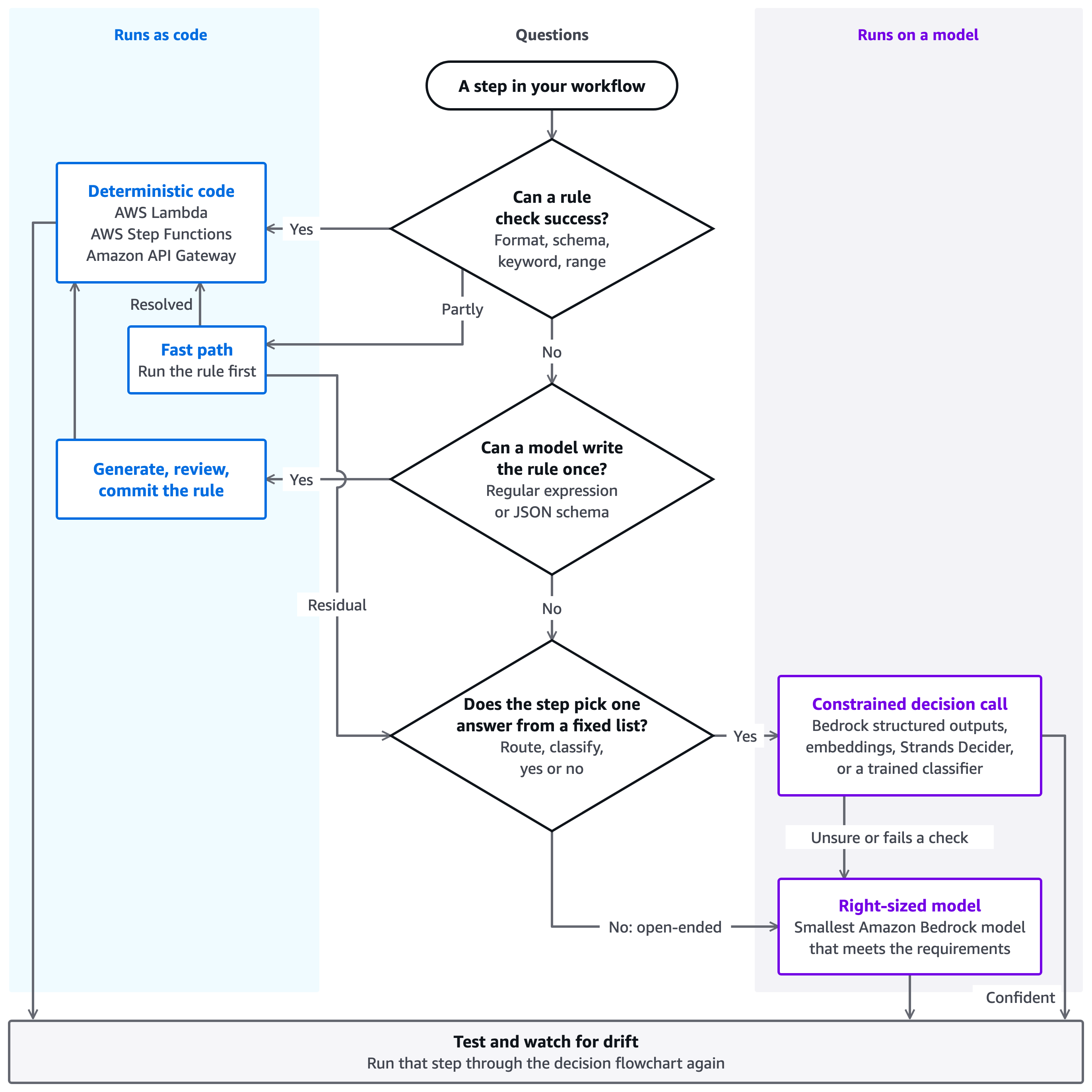
Figure 1: Deciding whether a workflow step needs a model, and which one
Consider a customer support assistant. The following table shows how five of its steps go through the chart.
| # | Step | Path through the chart | Where it runs |
| 1 | Check an order number’s format | A rule can check success. | Amazon API Gateway REST API request validation, or an AWS Lambda function |
| 2 | Route a message by intent | A rule settles part of it. A keyword match on the fast path resolves messages such as “refund”, and the residual goes to the third question. | An AWS Step Functions Choice state that uses JSONata. The residual goes to a constrained decision call. |
| 3 | Extract a tracking number from a carrier email | A model can write the rule once. It drafts a regular expression, and you review and commit it. | Code, as a committed pattern in AWS Lambda |
| 4 | Pick one of four support queues for a ticket | The answer comes from a fixed list. | A constrained decision call. Unsure answers escalate to the right-sized model. |
| 5 | Draft a reply to the customer | The task is open-ended. | The right-sized model, the smallest Amazon Bedrock model that meets the requirements |
You can use a model when a task is open-ended, ambiguous, or generative: summarizing a document, drafting a reply, extracting meaning from prose. Use deterministic code when the task has a checkable rule: an email format, a schema, an exact keyword, a numeric range. The following table shows what you trade away when you send a rule-shaped task to a model.
| Property | Deterministic code | Model call |
| Cost per invocation | Typically orders of magnitude lower | Per-token, non-trivial at scale |
| Latency | Single-digit milliseconds or less | Hundreds of milliseconds |
| Correctness on a well-specified rule | Exact for the rule as written | High, but with a non-zero error rate |
| Auditability | The rule sits in source control | Harder to explain to an auditor |
| Behavior over time | Stable until you change it | Changes when you move to a new model version, or when a version is retired |
A model can also hallucinate and return different answers to the same input. A temperature of 0 makes varied answers less likely, but it doesn’t guarantee identical output. Amazon Bedrock model evaluation and Amazon Bedrock Guardrails help you measure and contain these risks. A rule has neither problem, which is one reason regulated workloads favor rules. A useful test: If you can write the acceptance test as a rule, you can usually write the step as a rule. For more information, refer to Orchestration models: From rule-based to AI-native in AWS Prescriptive Guidance.
Decide, don’t generate
Most routing and classification steps sit between a rule and open-ended generation. A rule can’t decide every case, but these steps don’t need generated text either. They need one answer from a fixed list of options that you define in advance, like the support queues in the preceding example. Use a component that limits its output to the allowed answers and gives you a signal for when to escalate. Confident answers proceed, and uncertain ones escalate. The AWS Well-Architected Agentic AI Lens describes this tiered, confidence-based escalation. On AWS, you can build it four ways:
- A small Amazon Bedrock model with structured outputs – The answer is limited to an
enumof options, plus an ‘unsure’ option that triggers escalation. This is the model’s own judgment, not a calibrated score, so check it against labeled data before you use it to decide escalation. - Embedding similarity – Embed the input with an Amazon Bedrock embeddings model and pick the nearest labeled example. Use the similarity score as an escalation signal, and set its threshold on labeled data.
- Strands Decider, an experimental open source decision model under the Apache License 2.0 – It picks from options or scores against a rubric, and it returns a calibrated confidence with each answer. Its README reports that answers at a confidence of 0.9 or more are right about 95 percent of the time on short classification tasks. Because the model is experimental, validate that result on your own data before you use it in production. You host it yourself, for example on an Amazon SageMaker AI endpoint, by following the deployment guides in its repository.
- A trained classifier on Amazon SageMaker AI – It returns class probabilities with low latency and cost once you have labeled training data.
The following JSON schema limits a structured-output answer to four queues plus ‘unsure’. Amazon Bedrock requires every object in the schema to set additionalProperties to false.
{
  "type": "object",
  "properties": {
    "queue": {
      "type": "string",
      "enum": ["billing", "technical", "account", "other", "unsure"]
    }
  },
  "required": ["queue"],
  "additionalProperties": false
}
Whichever option you choose, check its escalation signal against your own labeled data, and set any threshold there. Keep your authorization decisions, such as a refund limit, in a rule.
The deterministic fast-path pattern
Many cost patterns focus on routing between models. The fast path goes one level earlier: Run the deterministic check first, and send only what the rule can’t settle to a model. Intent routing is one example. Many messages carry an unambiguous signal, such as “refund” or “reset my password”, which a keyword match resolves in single-digit milliseconds or less. If rules resolve 95 percent of requests, only 1 in 20 requests reaches a model, before any savings from model selection. (Illustrative arithmetic, not a benchmark.)
On AWS, you compose this from existing building blocks:
- AWS Step Functions Choice states branch before the workflow invokes any model.
- AWS Lambda hosts rules that need more than a Choice state, such as validation and schema checks.
- Amazon API Gateway (REST API) request validation rejects malformed input before any compute runs.
- A constrained decision call or an Amazon Bedrock model handles only the residual.
The following Choice state is a keyword fast path. It uses JSONata to send refund and password-reset messages straight to code, and it sends everything else to the constrained decision call.
"KeywordFastPath": {
  "Type": "Choice",
  "QueryLanguage": "JSONata",
  "Choices": [
    {
      "Condition": "{% $contains($states.input.message, /refund/i) %}",
      "Next": "RefundFlow"
    },
    {
      "Condition": "{% $contains($states.input.message, /reset (my )?password/i) %}",
      "Next": "PasswordResetFlow"
    }
  ],
  "Default": "ConstrainedDecisionCall"
}
You can also let a model write the rule once instead of running it every time. Have it draft a regular expression or a JSON schema, review it, and commit it. At runtime the rule runs at rule speed and cost. Review a model-written regular expression, and test it against known good and bad inputs. Avoid nested quantifiers such as (a+)+, which can make matching very slow on some inputs (regular expression denial of service, or ReDoS).
When you do generate, Amazon Bedrock structured outputs constrain a response to a JSON schema that you define. The response then matches the schema, so your code can parse it without custom parsing logic (check content for correctness). Keep range checks, such as numeric bounds and length limits, in code. For supported models and schema features, refer to Get validated JSON results from models.
If your rules live in configuration, allow only known primitives, such as regular expressions, schema checks, keyword lists, and range checks. Never run arbitrary code from a configuration file.
When you do need a model, right-size it
Choose the cheapest and fastest model that meets your quality floor. That is often not the newest or largest model. The Generative AI Lens covers this in its best practice on right-sizing model selection. Effective cost optimization strategies for Amazon Bedrock covers it in depth. Define the requirements before you compare models:
- Quality floor: The minimum acceptable output quality, measured on a golden evaluation set (labeled examples of the task with known-correct answers).
- Cost ceiling: The most you pay per request or per successful outcome.
- Latency target: The p95 or p99 response time the experience can tolerate.
- Compliance constraints: Requirements such as data residency that can rule out candidates.
Amazon Bedrock offers many model families and sizes behind one API, so you can right-size each task without changing your integration. Amazon Bedrock Intelligent Prompt Routing routes each request to a suitable model within a supported model family. Amazon Bedrock Model Distillation transfers knowledge from a larger model to a smaller, cheaper one for your use case. Model providers evaluate a new frontier model on broad benchmarks, but your workload is one task with one quality floor. A larger model can add cost and latency without improving that task. Before you switch, evaluate each launch against your requirements, such as quality on your golden evaluation set and your latency target.
Treat model choice as tested configuration
The Generative AI Lens recommends testing candidate models against your ground truth data and having a way to update the model quickly. Go further and treat the decision as a tested configuration:
- Keep a golden evaluation set per task, with labeled ground truth, and run it in continuous integration.
- Gate on your requirements. Treat a cheaper model that drops below the quality floor as a regression.
- Put the model behind a configuration flag so that you can reverse a swap.
- Verify with the right oracle. Check rules against ground truth. Reserve model-as-judge evaluation for open-ended outputs.
- Watch for drift. Sample some rule-resolved requests through a model in shadow mode, and reclassify a step when they disagree.
Putting it into practice
Spend model capacity where judgment is needed, and nowhere else. You can get there in four steps:
- Instrument – Tag every call as deterministic code, a constrained decision call, or a model call. Track cost per successful outcome.
- Move the rules to code – Run rule-checkable steps on AWS Lambda or AWS Step Functions. This is usually the largest and safest win.
- Add constrained decision calls – Route fixed-choice steps through a call that escalates when it is unsure.
- Test before you switch models – Run every new model through your golden evaluation set before it becomes the default.
Conclusion
In this post, you learned how to decide whether a workflow step needs a model at all. Rules belong in deterministic code, and fixed choices belong in a constrained decision call. Open-ended work goes to a right-sized Amazon Bedrock model. Aim to meet each requirement at the lowest cost and latency that your quality floor allows. Ask whether a step needs a model before you ask which one.
For more information, refer to these posts on the AWS Artificial Intelligence Blog:
- Use decision models with Amazon Bedrock AgentCore Evaluations.
- Use Amazon Bedrock Intelligent Prompt Routing for cost and latency benefits.
- Structured outputs on Amazon Bedrock: Schema-compliant AI responses.
- Fix evaluation bias to unlock better models on Amazon Bedrock.
To try a constrained decision call, open the Amazon Bedrock console, or deploy Strands Decider from its GitHub repository.
Start with one high-volume workflow and measure how much of it never needed a model.