 AI 热点
发布于 2026 年 11 月 19 日
腾讯 Hy4 已上线 Together AI腾讯旗舰模型现已能够理解图像和文本,你可以通过 serverless 或 dedicated endpoints 在 Together AI 上运行它。
要点速览
- 模型:
tencent/Hy4已上线 Together AI,支持 serverless 和 dedicated endpoints,拥有 100 万 token 的上下文窗口,并支持文本和图像输入。 - 价格: 每 100 万输入 token $0.83,每 100 万输出 token $2.50,每 100 万缓存输入 token $0.042。
- 能力: 图像输入、工具调用和 JSON 输出。
从今天起,你可以通过 serverless 和 dedicated endpoints 在 Together AI 上运行腾讯 Hy4。Hy4 是腾讯的旗舰模型,也是 Hy 系列中首款同时接受图像和文本输入的模型。
我们给它安排了两个小任务,看看它在实际应用中的表现:先从我们的一张图表中提取数据并用 HTML 重建该图表,然后根据一条提示词编写一个浏览器游戏。下面是它返回的结果,以及你自行发起图表请求所需的代码。
它读懂了我们的图表,然后将其重建
我们先测试视觉能力,因为这是 Hy4 新增的能力。我们从“ Together Storage Accelerator ”文章中选取了这张图表,将其截图交给 Hy4,并要求它以 JSON 格式给出图表内容。
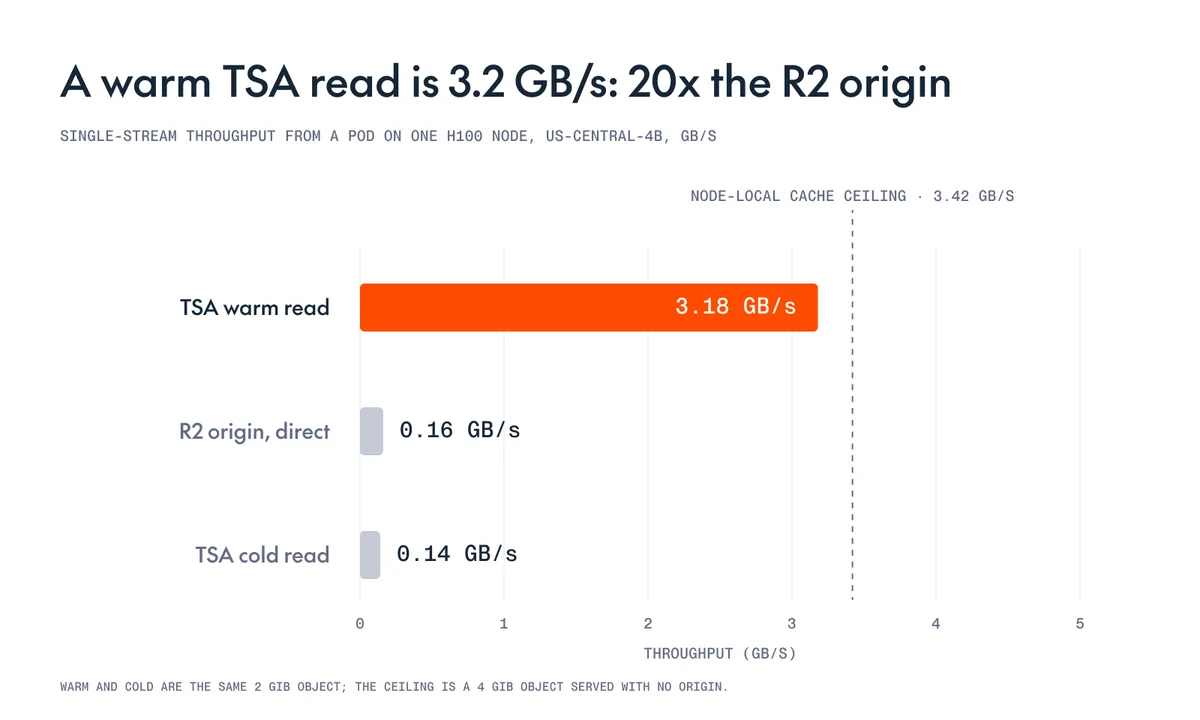
响应准确返回了标题和全部三个数值,与图表中显示的内容完全一致:
{
  "title": "A warm TSA read is 3.2 GB/s: 20x the R2 origin",
  "bars": [
    {
      "label": "TSA warm read",
      "value": 3.18
    },
    {
      "label": "R2 origin, direct",
      "value": 0.16
    },
    {
      "label": "TSA cold read",
      "value": 0.14
    }
  ]
}
接下来,我们让它使用同一张截图,将图表复刻为单个 HTML 文件。这一次,输出不仅要保留数值,还要保留视觉布局。上方是原图,下方是 Hy4 生成的版本。
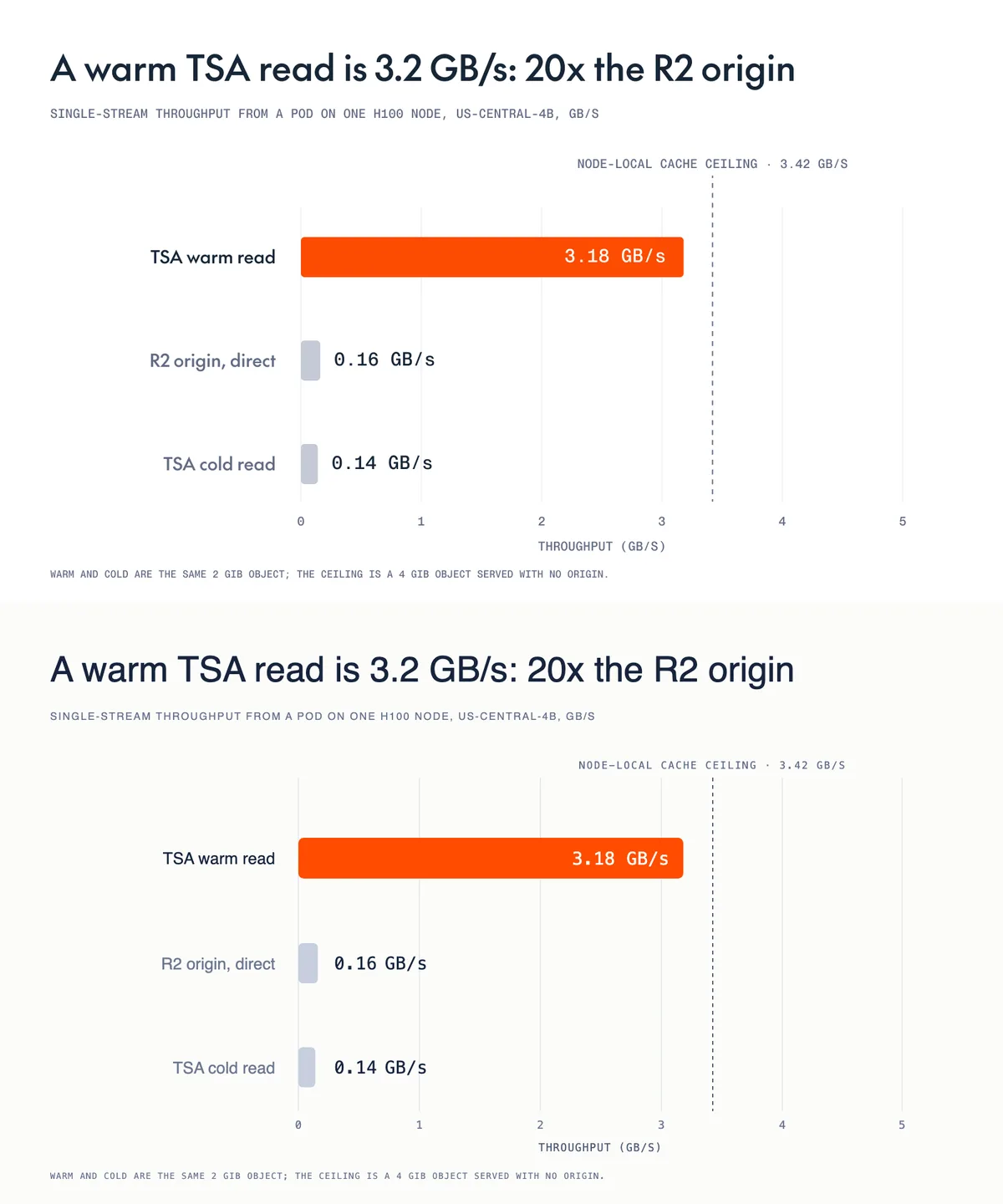
Hy4 复刻了布局、标签、数值、颜色、虚线界限和脚注。我们要求它使用通用字体,因此字形有所不同。
它编写了一个游戏
在第二项测试中,我们给 Hy4 的是文本提示词而非图像,并要求它在不使用任何库或外部资源的情况下,将浏览器游戏编写在一个 HTML 文件中:
在单个 HTML 文件中制作一款小巧、原创的浏览器游戏,不使用任何库和外部资源。游戏应支持键盘控制,包含分数、失败机制和重新开始功能,并且能让人愉快地玩上两分钟。仅回复 HTML。
Hy4 返回了一款名为 Polarity 的游戏。我们将响应保存为 HTML 文件,没有修改代码便直接在浏览器中打开。
方块会从屏幕顶部落下。你需要接住与自己颜色相同的方块,并按空格键切换颜色。如果黄色危险物落到你所在的位置,本轮游戏就会结束。Hy4 还添加了一个介绍规则的标题画面,以及可在不同轮次之间保留的最高分;这两项功能都不是我们要求的。
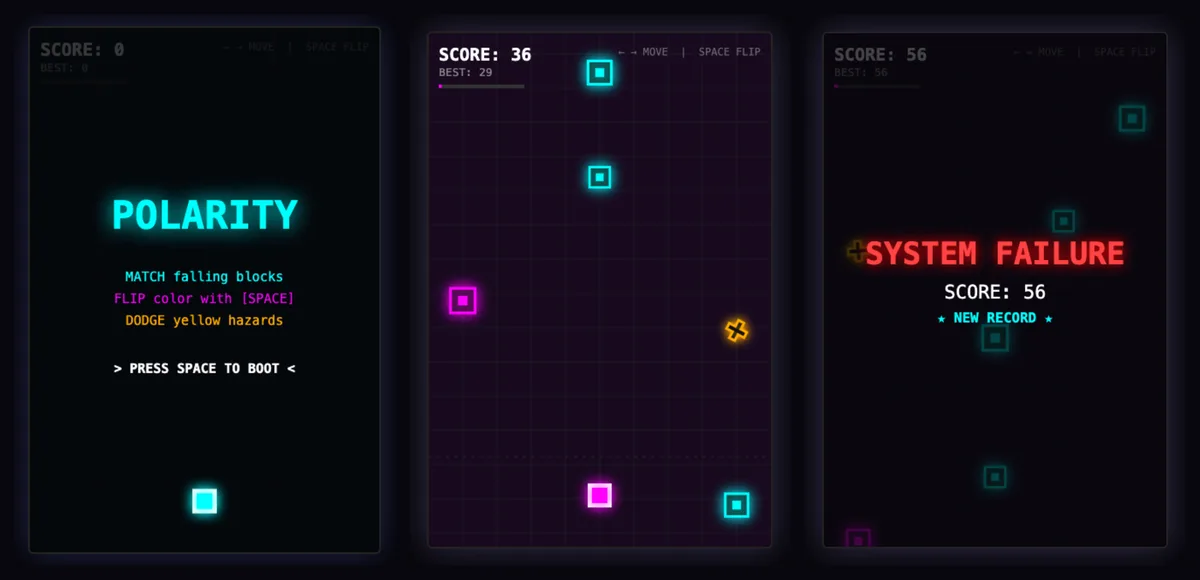
我们完整玩了一轮,进入游戏结束画面,并成功重新开始。
在 Together AI 上运行
Hy4 现已上线,可使用模型字符串 tencent/Hy4, 通过 Together 的聊天补全 API 调用。下面的示例就是本文前面使用的图表请求。要运行该示例,请安装 Together Python SDK(pip install together),设置一个 TOGETHER_API_KEY, 并将 我们使用的图表 保存为 chart.png.
import base64

from together import Together

client = Together()

with open("chart.png", "rb") as f:
    image = base64.b64encode(f.read()).decode()

response = client.chat.completions.create(
    model="tencent/Hy4",
    messages=[
        {
            "role": "user",
            "content": [
                {
                    "type": "text",
                    "text": "Read this chart. Return a JSON object with a title "
                    "and a list of bars, each with a label and a value.",
                },
                {
                    "type": "image_url",
                    "image_url": {"url": f"data:image/png;base64,{image}"},
                },
            ],
        }
    ],
    response_format={"type": "json_object"},
)

print(response.choices[0].message.content)
如果你想在编写任何代码之前试用 Hy4,可以 在 Playground 中打开它,而 模型页面 提供了完整详情。有关更广泛的发布信息,包括 Hy4 新增的计算机使用能力,请参阅 腾讯公告.
现已推出 在 Together AI 上运行腾讯 Hy4 100 万 token 上下文,支持文本和图像输入、工具调用和 JSON 输出,可通过 serverless 和 dedicated endpoints 使用。 打开 Playground常见问题
腾讯 Hy4 在 Together AI 上的费用是多少?
Together AI 上的腾讯 Hy4 每 100 万输入 token 收费 $0.83,每 100 万输出 token 收费 $2.50,每 100 万缓存输入 token 收费 $0.042。
腾讯 Hy4 在 Together AI 上的上下文窗口有多大?
腾讯 Hy4 在 Together AI 上拥有 100 万 token 的上下文窗口,可使用模型字符串 tencent/Hy4.
腾讯 Hy4 接受图像输入吗?
是的,腾讯 Hy4 在 Together AI 上接受文本和图像输入并返回文本,而且它是腾讯 Hy 系列中首款具备视觉能力的模型。发送图像时,需要像上面的示例一样,在消息内容中将每张图像作为一个 image_url 块发送。
腾讯 Hy4 支持 JSON 输出和工具调用吗?
是的,腾讯 Hy4 在 Together AI 上同时支持这两项能力。要获得 JSON 输出,请将 response_format 设置为 {"type": "json_object"},;要启用工具调用,请通过标准的 tools 参数传入你的函数。
我可以在 dedicated endpoint 上运行腾讯 Hy4 吗?
可以。腾讯 Hy4 在 Together AI 上同时支持 serverless 和 dedicated 基础设施,因此你可以从 serverless 开始,并在需要预留容量时迁移到 dedicated endpoint。