 AI 热点
Published 11/19/2026
Tencent Hy4 is live on Together AITencent's flagship model now understands images as well as text, and you can run it on Together AI through serverless or dedicated endpoints.
Authors
Sonny Khan
Table of contents
Links in this article
TL;DR
- The model:
tencent/Hy4on Together AI, serverless and dedicated, with a 1M-token context window and text and image input. - The price: \$0.83 per 1M input tokens, \$2.50 per 1M output tokens, \$0.042 per 1M cached input tokens.
- Capabilities: image input, tool calling and JSON output.
Starting today, you can run Tencent Hy4 on Together AI through serverless and dedicated endpoints. Hy4 is Tencent's flagship model and the first in the Hy family to accept images alongside text.
We gave it two small jobs to see what it does in practice: extracting the data from one of our charts and rebuilding that chart in HTML, then writing a browser game from a single prompt. Here's what came back, along with the code to make the chart request yourself.
It read our chart, then rebuilt it
We started with vision, since that's the capability Hy4 adds. We took this chart from our Together Storage Accelerator post, gave Hy4 a screenshot of it, and asked for its contents as JSON.
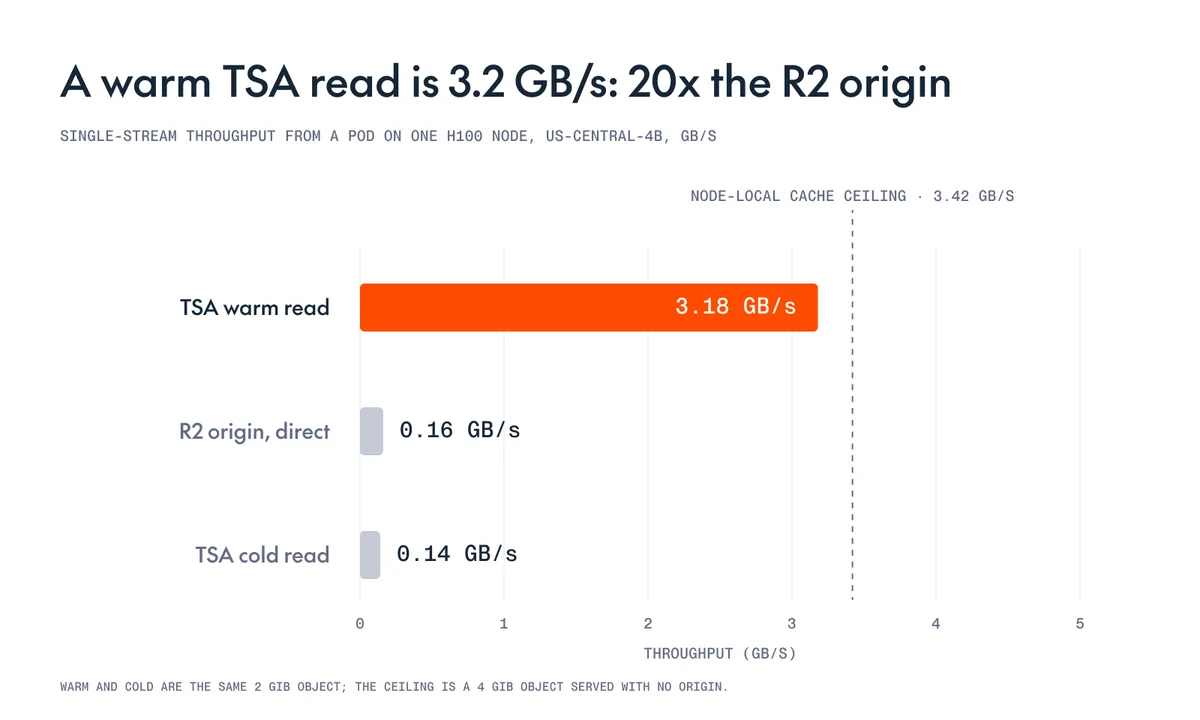
The response returned the title and all three values exactly as they appear in the chart:
{
  "title": "A warm TSA read is 3.2 GB/s: 20x the R2 origin",
  "bars": [
    {
      "label": "TSA warm read",
      "value": 3.18
    },
    {
      "label": "R2 origin, direct",
      "value": 0.16
    },
    {
      "label": "TSA cold read",
      "value": 0.14
    }
  ]
}
Next, we asked it to reproduce the chart as a single HTML file, using the same screenshot. This time, the output needed to preserve the visual layout as well as the numbers. The original is on top, and Hy4's version is below it.
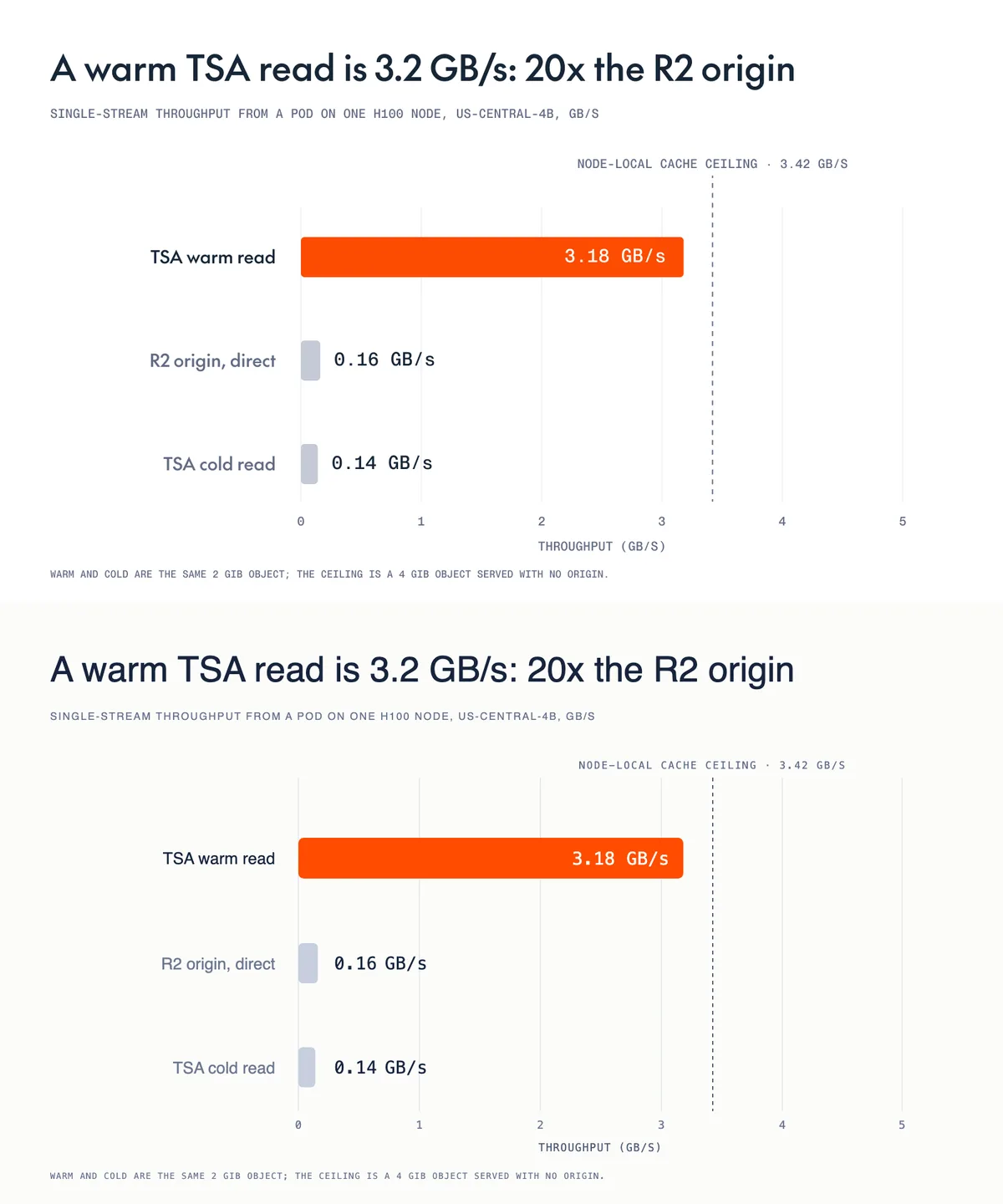
Hy4 reproduced the layout, the labels, the values, the colors, the dashed ceiling line and the footnote. We asked it to use generic fonts, so the typeface differs.
It wrote a game
For the second test, we gave Hy4 a text prompt rather than an image and asked it to write a browser game in one HTML file, with no libraries or external assets:
Make a small, original browser game in a single HTML file, with no libraries and no external assets. Keyboard controls, a score, a way to lose and a restart. It should be fun for two minutes. Reply with only the HTML.
Hy4 returned a game called Polarity. We saved the response as an HTML file and opened it in a browser without changing the code.
Blocks fall from the top of the screen. You catch the ones that match your color and press Space to switch colors. A yellow hazard ends the run if it reaches you. Hy4 also added a title screen that explains the rules and a best score that carries over from one round to the next, neither of which we asked for.
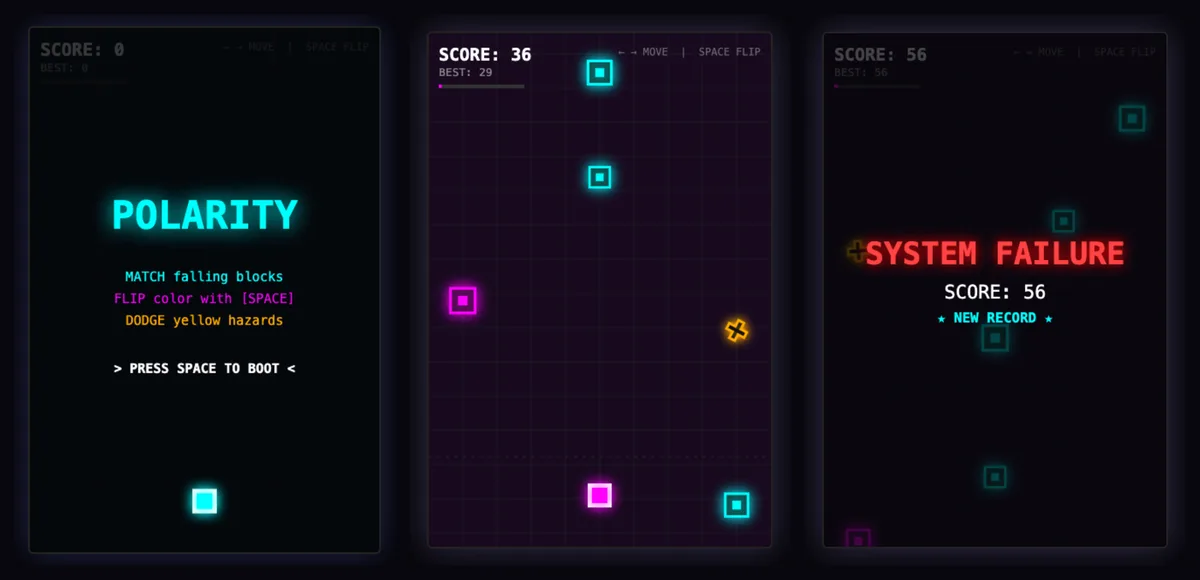
We played through a round, reached the game-over screen and restarted successfully.
Run it on Together AI
Hy4 is available now under the model string tencent/Hy4, through Together's chat completions API. The example below is the chart request from earlier in this post. To run it, install the Together Python SDK (pip install together), set a TOGETHER_API_KEY, and save the chart we used as chart.png.
import base64

from together import Together

client = Together()

with open("chart.png", "rb") as f:
    image = base64.b64encode(f.read()).decode()

response = client.chat.completions.create(
    model="tencent/Hy4",
    messages=[
        {
            "role": "user",
            "content": [
                {
                    "type": "text",
                    "text": "Read this chart. Return a JSON object with a title "
                    "and a list of bars, each with a label and a value.",
                },
                {
                    "type": "image_url",
                    "image_url": {"url": f"data:image/png;base64,{image}"},
                },
            ],
        }
    ],
    response_format={"type": "json_object"},
)

print(response.choices[0].message.content)
If you'd like to try Hy4 before writing any code, you can open it in the playground, and the model page has the full details. For the wider release, including Hy4's new computer-use capabilities, see Tencent's announcement.
Available now Run Tencent Hy4 on Together AI 1M-token context, text and image input, tool calling and JSON output, on serverless and dedicated endpoints. Open the playgroundFAQs
How much does Tencent Hy4 cost on Together AI?
Tencent Hy4 on Together AI costs \$0.83 per 1M input tokens, \$2.50 per 1M output tokens and \$0.042 per 1M cached input tokens.
What is the context window of Tencent Hy4 on Together AI?
Tencent Hy4 has a 1M-token context window on Together AI, and you call it with the model string tencent/Hy4.
Does Tencent Hy4 accept images?
Yes, Tencent Hy4 accepts text and image input on Together AI and returns text, and it's the first model in Tencent's Hy family with vision. You send each image as an image_url block in the message content, as in the example above.
Does Tencent Hy4 support JSON output and tool calling?
Yes, Tencent Hy4 supports both on Together AI. You get JSON output by setting response_format to {"type": "json_object"}, and you enable tool calling by passing your functions in the standard tools parameter.
Can I run Tencent Hy4 on a dedicated endpoint?
Yes, Tencent Hy4 is available on Together AI on both serverless and dedicated infrastructure, so you can start on serverless and move to a dedicated endpoint when you need reserved capacity.