Artificial Intelligence
Building ultra-low-latency voice AI applications on AWSConversational AI is transforming how humans interact with technology. From virtual assistants and AI-powered contact centers to real-time translation and accessibility tools, voice-first interfaces are rapidly becoming the default mode of interaction for millions of users worldwide.
Yet delivering a truly natural voice experience remains one of the hardest challenges in AI infrastructure. Users expect human-like responsiveness. Excess latency can break conversational flow and erode trust. To feel natural, AI-generated speech must arrive within the same temporal window as human turn-taking.
This post introduces how Cartesia, an AWS Partner specializing in real-time voice AI, uses purpose-built State Space Models (SSMs) and AWS infrastructure to deliver sub-100ms text-to-speech and speech-to-text at global scale. Developers can build voice experiences that feel indistinguishable from human conversation.
The rise of conversational AI and latency expectations
The demand for real-time voice AI is growing rapidly across industries:
- Contact centers: AI agents handling millions of customer interactions require instantaneous speech generation to maintain natural dialogue.
- Telehealth: Remote patient consultations demand low-latency voice for accurate, empathetic communication.
- Gaming and virtual worlds: Immersive experiences require real-time voice synthesis for non-player characters (NPCs) and player interactions.
- Accessibility: Screen readers and voice interfaces must respond instantly to serve users with visual impairments.
- Inbound and outbound sales: AI sales agents must respond without awkward pauses to qualify leads, handle objections, and keep prospects on the line.
Traditional transformer-based text-to-speech (TTS) models struggle with streaming latency because they process entire sequences before producing output. This architectural limitation creates a fundamental tension: higher quality often means higher latency. A new class of models, State Space Models, resolves this trade-off.
AI for voice: State Space Models (SSM)
State Space Models (SSMs) take a fundamentally different approach to processing sequences than transformers, the architecture behind most of today’s AI. Transformers use a mechanism called attention, which compares every element in a sequence to every other element. As a result, the amount of computation grows quadratically as the sequence gets longer. SSMs instead treat a sequence as a system that evolves continuously over time, processing it step by step and carrying a compact internal state forward. This can be converted into a form computers handle efficiently, keeping the cost low for certain long sequences. This efficiency makes SSMs well suited to real-time, streaming data like live speech.
Key advantages of SSMs for audio processing include:
- High-quality long-range dependencies: Structured SSMs are a form of linear recurrence, but their state parameterization preserves information over long audio sequences, avoiding the long-range signal decay that limits classic recurrent neural networks (RNNs) such as long short-term memory (LSTM) networks.
- Constant memory footprint: Unlike transformers that cache all previous tokens, SSMs maintain a fixed-size hidden state.
- Native streaming support: The recurrent structure processes input token-by-token, so it supports true streaming without architectural modifications.
These properties make SSMs uniquely suited for real-time voice applications where both quality and latency are non-negotiable.
How it works: SSMs for real-time voice
Cartesia puts these SSM advantages to work in two production voice models: Sonic for speech generation and Ink for transcription.
Introducing Cartesia
Cartesia is a real-time multimodal intelligence company that has built a voice AI application, purpose-built on State Space Model architecture. Founded by researchers who pioneered SSM advances, Cartesia’s application is designed for streaming inference at the edge of human perception.
The application features two core models, Sonic for text-to-speech and Ink for speech-to-text, both optimized for sub-100ms first-byte latency while maintaining studio-quality output.
Sonic (text-to-speech)
Sonic is Cartesia’s flagship streaming text-to-speech model, delivering ultra-realistic speech synthesis with sub-100ms latency:
- First audio byte in approximately 90ms: Users hear the voice respond almost instantaneously.
- Ultra-realistic voice quality: Natural prosody, emotion, and expressiveness across over 44 languages.
- Voice cloning with minimal data: Create natural-sounding custom voices from 10-second audio samples.
- Streaming-native architecture: Audio begins generating before the full text input is received.
- Context-aware synthesis: Maintains consistent tone and style across long passages.
Sonic is recommended for teams that want the fastest time-to-production with minimal operational overhead. Call the API and receive streaming audio in real time.
Ink (speech-to-text)
Ink is Cartesia’s streaming speech-to-text model, purpose-built for conversational AI applications:
- Native turn detection: Automatically identifies when a speaker has finished their turn, alleviating awkward pauses without a separate voice activity detection (VAD) or end pointing model.
- Context-aware end pointing: Uses semantic understanding to distinguish between mid-sentence pauses and true conversation boundaries.
- Streaming transcription: Emits partial transcripts in real time as the user speaks, so a downstream large language model (LLM) can begin forming its response before the turn ends.
- Noise robustness: Maintains accuracy in noisy environments common in real-world deployments.
- Multi-speaker support: Handles overlapping speech and speaker transitions gracefully.
Together, Sonic and Ink provide the complete voice AI stack needed to build conversational agents that feel human.
Deploying Cartesia on AWS
If you need data sovereignty, latency control, or compliance, you can deploy Cartesia models directly into your own AWS account. Sonic is delivered as an Amazon SageMaker AI model package through AWS Marketplace, which you deploy to a SageMaker AI endpoint running entirely within your virtual private cloud (VPC). Inference data doesn’t leave your account.
The deployment patterns in this section cover Sonic. Ink is currently available through the Cartesia API, which you can purchase through the Cartesia Voice AI Platform listing in AWS Marketplace. Two primary patterns are available for Sonic.
Option 1: Amazon SageMaker AI (AWS Marketplace model package)
Deploying on Amazon SageMaker AI is the fastest path to a managed, in-VPC Sonic endpoint. Sonic ships as an AWS Marketplace model package, so there’s a one-time subscribe step that grants your account an AWS Region-specific model-package ARN. You then create the SageMaker AI endpoint from that ARN, either from the console or with the SageMaker or Boto3 SDK. The following steps follow Cartesia’s official deployment notebook.
Prerequisites
Run from an Amazon SageMaker Notebook Instance or SageMaker Studio.
The AWS Identity and Access Management (IAM) execution role needs AmazonSageMakerFullAccess.
To subscribe, your role (and you) need aws-marketplace:Subscribe, aws-marketplace:Unsubscribe, and aws-marketplace:ViewSubscriptions. Otherwise, the account must already be subscribed to the listing.
Before deployment, choose a supported instance type from the model package’s SupportedRealtimeInferenceInstanceTypes field:
ml.g6e.xlargeor largerml.g7e.2xlargeor largerml.g7.2xlargeor largerml.p5.48xlargeml.p5en.48xlarge
If your chosen instance type’s applied value is below your current usage plus your planned endpoint instance count, you may need to request a service quota increase. See SageMaker AI quotas for details.
Deploy Sonic 3.6 to a SageMaker endpoint
In Amazon SageMaker JumpStart, you can subscribe to its AWS Marketplace model package, create a SageMaker model, and host it on a real-time endpoint. The following four steps show the deployment path.
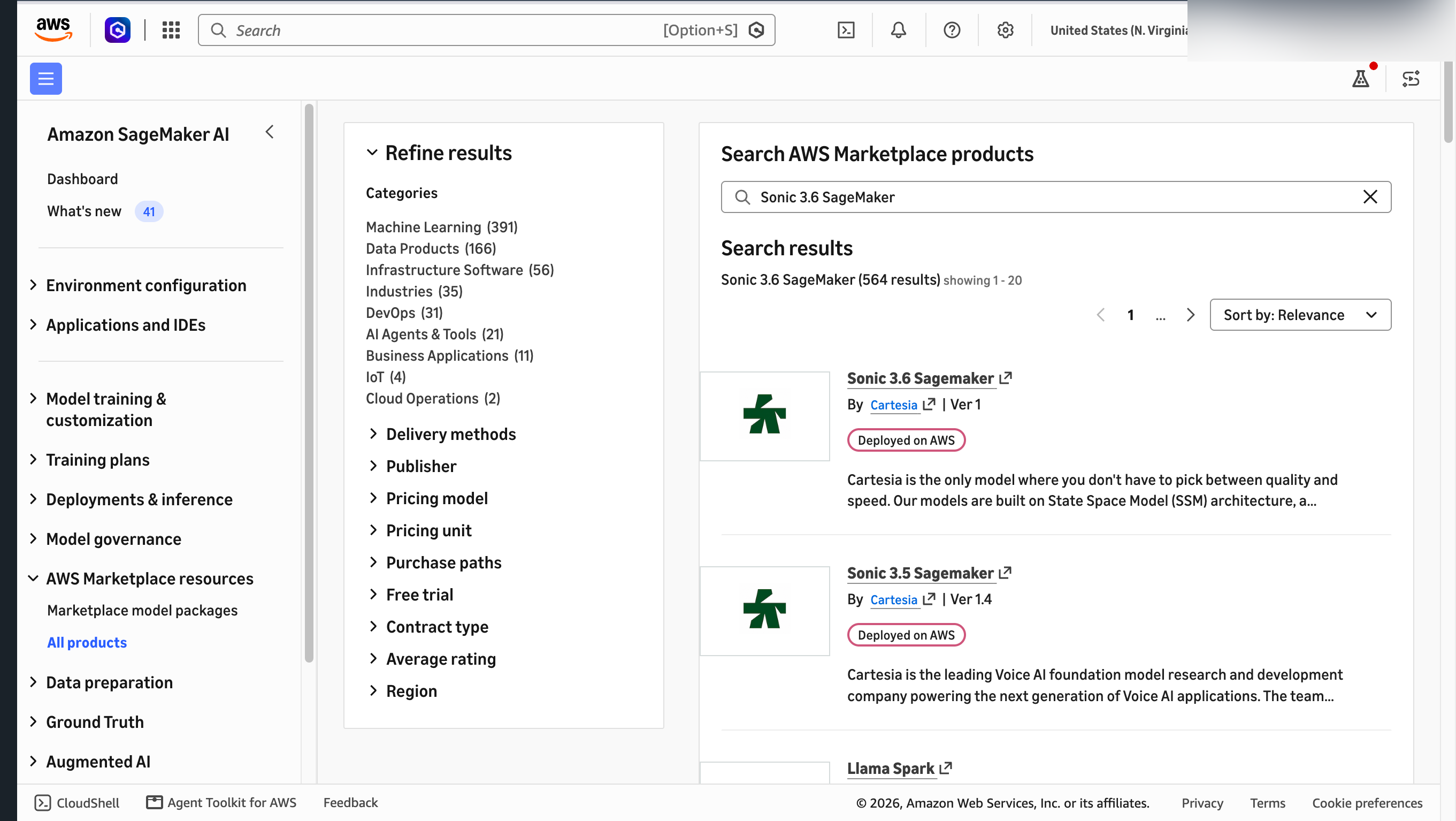
- In SageMaker AI, open AWS Marketplace resources, then All products. Search for Sonic 3.6 SageMaker and choose the Cartesia listing.

Figure 1: Searching AWS Marketplace for the Cartesia Sonic 3.6 SageMaker model package
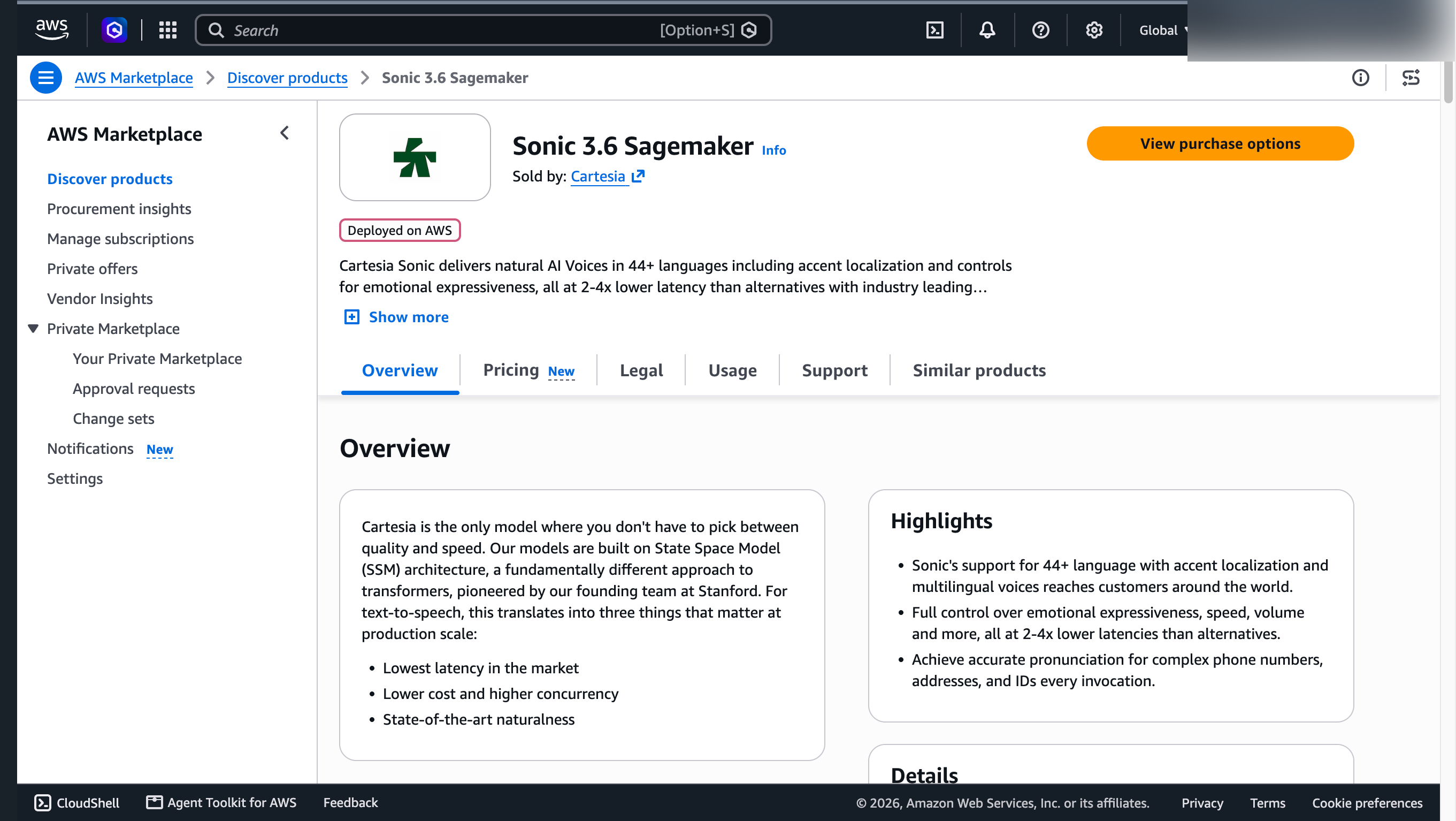
- Choose View purchase options, review the pricing and terms, and subscribe. The subscription grants your AWS account access to the model package. It doesn’t deploy resources.

Figure 2: The Cartesia Sonic 3.6 listing in AWS Marketplace
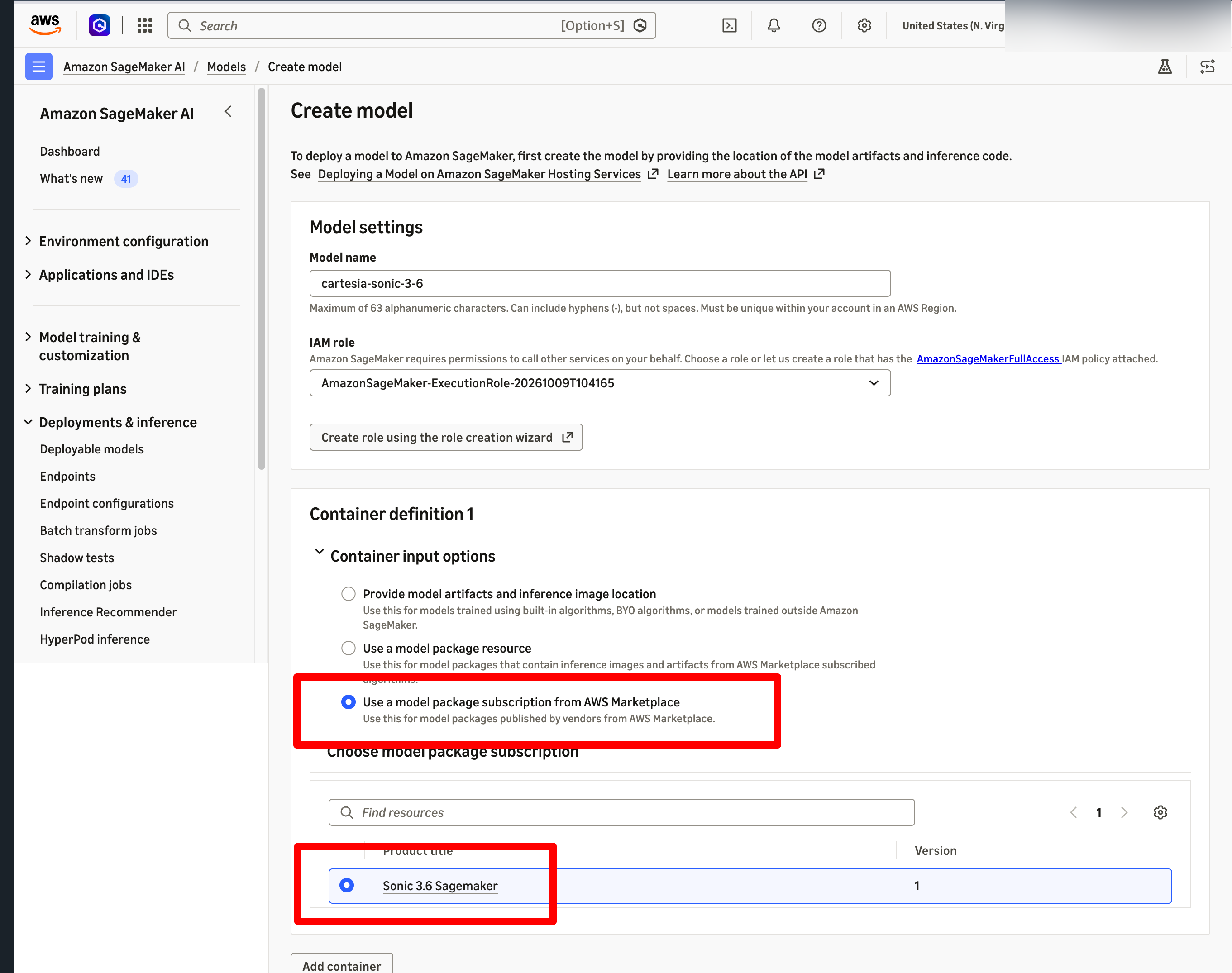
- Open Deployments & inference > Deployable models, choose Create model, select Use a model package subscription from AWS Marketplace, and select Sonic 3.6 SageMaker. Choose an execution role, then create the model.

Figure 3: Creating a SageMaker model from the Sonic 3.6 subscription
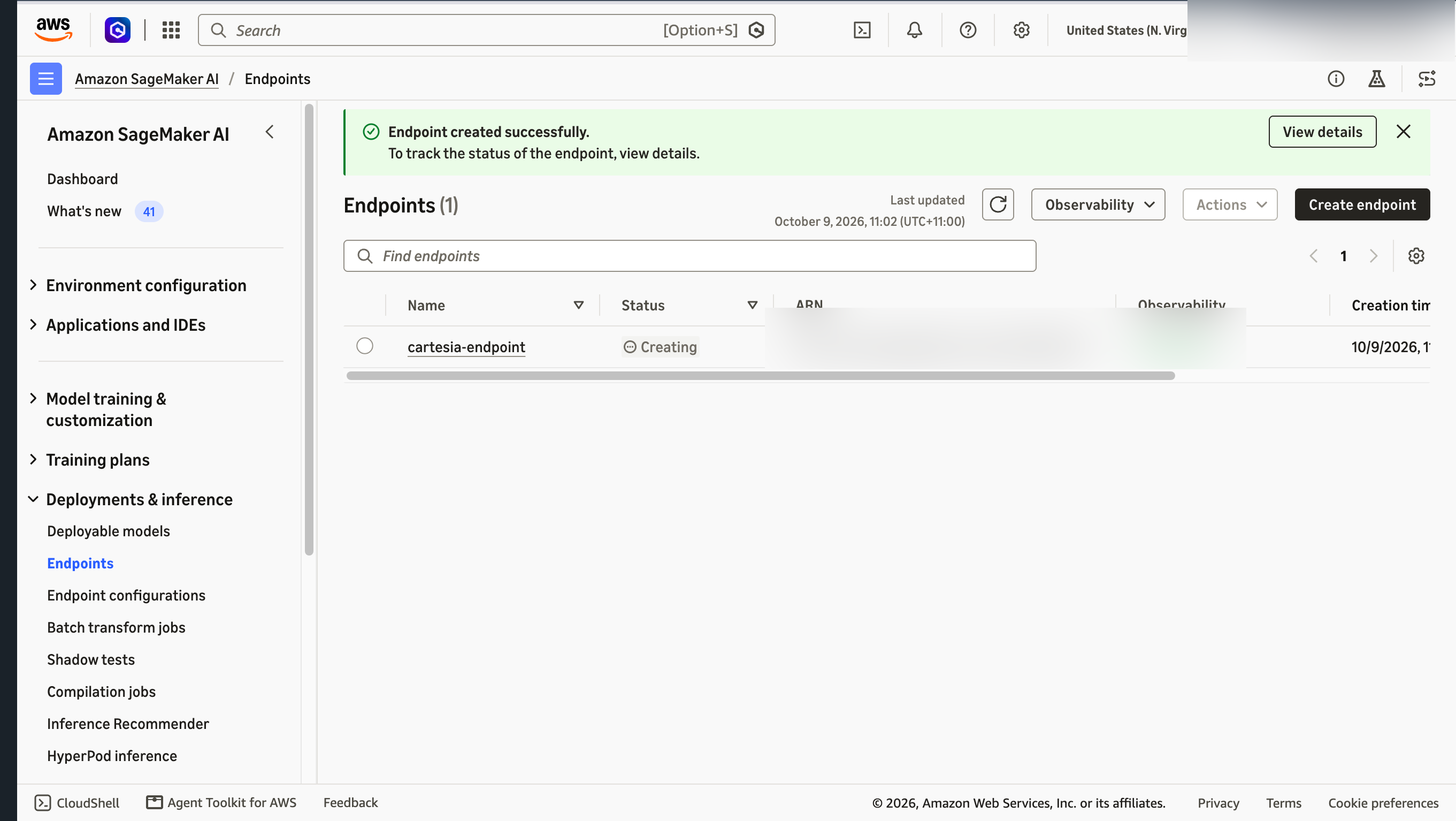
- Create a real-time endpoint from the model with a supported GPU instance, such as
ml.g6e.2xlarge. The endpoint first appears with Creating status. Wait for InService before invoking it.
Figure 4: The SageMaker endpoint for Sonic 3.6
The model-package ARN is Region-specific. To verify the Sonic 3.6 package in US East (N. Virginia) with the SageMaker API, run:
export MODEL_PACKAGE_ARN="arn:aws:sagemaker:us-east-1:865070037744:model-package/sonic36-sagemaker-v0-c6e9cacffcdf31178d1bd7c98c587480"

aws sagemaker describe-model-package \
    --model-package-name "$MODEL_PACKAGE_ARN" \
    --region us-east-1 \
    --query '{Status:ModelPackageStatus,ProductId:InferenceSpecification.Containers[0].ProductId,InstanceTypes:InferenceSpecification.SupportedRealtimeInferenceInstanceTypes}'
After the endpoint reaches InService, invoke it with the SageMaker Runtime InvokeEndpointWithResponseStream API and process the returned audio stream in your application.
Option 2: Self-managed on EC2 GPU instances
Some teams have existing GPU infrastructure, strict networking requirements, or a need to co-locate Cartesia with other services. For these cases, you can run the model container yourself on Amazon Elastic Compute Cloud (Amazon EC2) GPU instances. This gives you full control over the runtime, scaling, and network path. It uses Cartesia’s container image, obtained from Cartesia, rather than the AWS Marketplace model package.
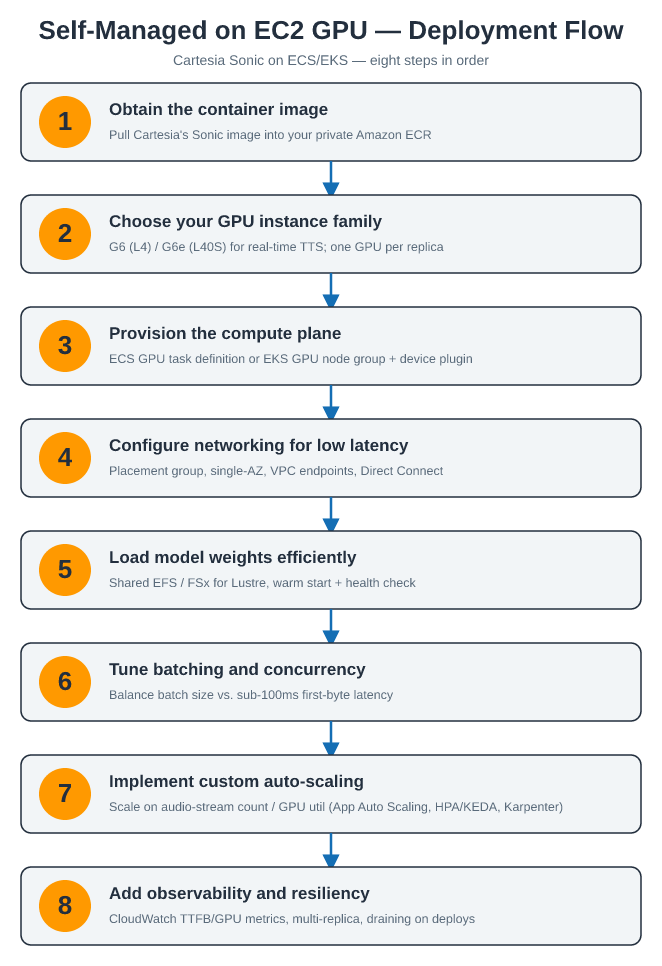
Figure 5: Self-managed deployment flow for Cartesia Sonic on Amazon EC2 GPU instances
Obtain the container image. Request the Sonic container image and licensing terms from Cartesia. Replicate it into your own private Amazon Elastic Container Registry (Amazon ECR) repository so your compute plane can pull it with IAM-scoped credentials rather than reaching out to an external registry at scale.
Choose your GPU instance family. Sonic runs on NVIDIA GPU instances. The G6 (L4) and G6e (L40S) families are the optimal balance for real-time TTS. The earlier G5 (A10G) also works. Match GPU memory and vCPU to your target concurrency and prefer a single-GPU instance per model replica for simplest scaling.
Provision the compute plane (Amazon Elastic Container Service (Amazon ECS) or Amazon Elastic Kubernetes Service (Amazon EKS)). For ECS: register a GPU task definition (set the container’s GPU resource requirement, for example, resourceRequirements with type GPU) and run it as a service behind an Application Load Balancer. For EKS: create a GPU node group (or Karpenter provisioner) using the EKS GPU-optimized AMI, install the NVIDIA device plugin, and deploy the container as a Deployment fronted by a Service/Ingress.
Configure networking for low latency. Place inference nodes in a cluster placement group to minimize inter-node latency, keep replicas in a single Availability Zone for the tightest path, and use VPC endpoints for ECR/S3 pulls. For hybrid or on-premises callers, terminate traffic over AWS Direct Connect or a private Network Load Balancer to avoid public-internet hops.
Load model weights efficiently. Store model weights on a shared, low-latency volume (Amazon Elastic File System (Amazon EFS) or Amazon FSx for Lustre) mounted across replicas so new pods/tasks start without each re-downloading multi-GB artifacts. Warm the model at container start and expose a health check so the load balancer only routes to ready replicas.
Tune batching and concurrency. Set the container’s max batch size and concurrent-stream limits to match your traffic profile. Higher batch size improves GPU utilization but adds first-byte latency, so tune against your sub-100ms target. Benchmark streams-per-GPU to find the replica capacity you will scale on.
Implement custom auto scaling. Scale on a signal that reflects real load, active audio-stream count or GPU utilization, rather than CPU. On Amazon ECS, use AWS Application Auto Scaling with a custom Amazon CloudWatch metric. On Amazon EKS, use HPA/KEDA driven by a GPU or stream-count metric, with Karpenter (or Cluster Autoscaler) adding GPU nodes as replicas grow.
Add observability and resiliency. Emit latency (time-to-first-byte), stream counts, and GPU metrics to CloudWatch. Run at least two replicas across nodes for availability. Set rolling-update or draining policies so deployments don’t drop in-flight audio streams.
This approach is recommended when integrating Cartesia into an existing machine learning (ML) system, meeting networking or compliance requirements not available through managed services, or optimizing cost with Reserved or Spot GPU capacity. The trade-off is that you own provisioning, scaling, patching, and monitoring that SageMaker would otherwise handle for you.
Learn more: See Amazon ECS task definitions for GPU workloads, managing NVIDIA GPU devices on Amazon EKS, and getting started with GPU-accelerated EC2 instances.
Choosing the right deployment pattern
AWS offers two ways to run Sonic, each suited to a different starting point.
The managed path, using the Amazon SageMaker AI model package from AWS Marketplace, is the default for most teams: you subscribe, deploy to an in-VPC endpoint in minutes, and let SageMaker handle scaling and operations.
The self-managed path, running the model container yourself on EC2 GPU instances, is designed for teams with specific constraints: existing GPU infrastructure, strict networking requirements, or a need to co-locate Cartesia with other services. For these teams, full control over the runtime, scaling, and network path matters more than time to deployment.
The following table summarizes how the two compare.
| Criteria | SageMaker (Marketplace) | EC2 GPU (Self-Managed) |
| Time to Deployment | Minutes after subscribing | Hours to days |
| Compute | Real-time endpoint. See SupportedRealtimeInferenceInstanceTypes for supported instances. |
EC2 GPU instances |
| Operational Control | Managed by AWS | Full control |
| Scaling | SageMaker automatic scaling | Custom scaling policies |
| Cost Model | Software fee + per instance hour + infra | EC2 (Reserved/Spot savings) |
| Networking | In-VPC endpoint (network isolation) | Placement groups, Direct Connect |
| Best For | Fast, managed, in-VPC | Custom infra, max control |
Beyond deploying Cartesia in your own account, these models are already proven in production inside Amazon services, and few environments are more demanding for real-time voice than a live contact center. Amazon Connect is exactly that proving ground.
In production: Amazon Connect
This section shows how Cartesia’s voice models operate inside Amazon Connect at production scale.
What is Amazon Connect?
Amazon Connect is a cloud-based contact center service that businesses use to set up and run customer support operations that handle inbound and outbound voice calls, chat, and messaging. With pay-as-you-go pricing and deep integration with AWS services, Amazon Connect powers millions of customer interactions daily across industries from financial services to healthcare.
How Cartesia powers the Amazon Connect experience
Cartesia’s voice AI models integrate natively with Amazon Connect to deliver next-generation contact center experiences:
- Instant responsiveness: Alleviate unnatural pauses that erode customer confidence in AI-powered interactions.
- Real-time transcription: Ink provides live transcription with intelligent turn detection for agent-assist workflows.
- Multilingual support: Serve customers in over 44 languages with consistent voice quality and natural prosody.
- Scalable infrastructure: Handle traffic spikes during peak hours without degradation in voice quality or latency.
By combining the omnichannel orchestration of Amazon Connect with Cartesia’s real-time voice AI, you can automate complex customer interactions while maintaining the natural, responsive experience that builds trust and loyalty.
Getting started
Ready to build ultra-low-latency voice AI applications? Here are next steps:
- Deploy Sonic through SageMaker JumpStart: Search for “Cartesia” in the SageMaker JumpStart model hub and deploy a real-time endpoint in minutes.
- Try the Cartesia API: Get started with the Cartesia get-started guide. No infrastructure setup required.
- Explore reference architectures: Visit the Cartesia GitHub repository for sample notebooks, deployment templates, and integration examples.
- Contact the team: Reach out to Cartesia on AWS Marketplace.