人工智能
不再猜测 Amazon SageMaker AI 上 TTS 的自动扩缩容目标流量高峰冲击你自托管的文本转语音(TTS)端点,请求开始排队。延迟在你服务等级目标(SLO)之上攀升,而这恰恰发生在最多来电者收听的时候。该端点背后的自动扩缩容策略本应防止这种情况,但它所依据的扩缩容目标值只是一个猜测,而这类猜测会悄无声息地失败,直到真实流量证明它们是错的。
把这个数字搞错,代价会以两种方式之一付出,而两者都不会以告警的形式出现。猜得太保守,集群就会运行大部分时间闲置的 GPU 实例。这笔成本会落在每一张账单上,却永远不会触发事件报告。猜得太激进,集群就背负着无人察觉的风险。每个实例承载的并发请求数超过了它能在延迟承诺内处理的数量。一切看起来都没问题,直到真实的流量高峰把排队时间推过 SLO。而这恰恰发生在最多来电者收听的时候。这就是隐藏的缺口。一个在控制台上看起来没问题的策略,可能已经在辜负它本应服务的人。
在本文中,我们将 Kokoro-82M, 一个 8200 万参数的 TTS 模型,作为自定义容器部署在 Amazon SageMaker AI 实时端点上。 AWS Cloud Development Kit (AWS CDK) 堆栈负责部署。我们用针对实时端点进行的两次测量取代猜测。 Q_max 是一个实例在突破 SLO 之前所能维持的最高并发数,而 T_total 是一次扩容端到端所需的时间。我们通过算术从这两个数字推导出扩容阈值、缩容阈值以及两个冷却时间。本文中的每个数字都来自本文所引用的 aws-samples 仓库的一次实际部署和测量运行。
为什么默认自动扩缩容指标不适用于 TTS
大多数关于 Amazon SageMaker AI 自动扩缩容目标的公开指南针对的是短同步请求/响应调用,或大语言模型(LLM)服务,其自然指标是每秒生成的 token 数。TTS 合成不符合这两种模式:单个请求会让连接保持打开数秒,且没有 token 生成循环可供挂接指标。Kokoro-82M 是非自回归的,是 StyleTTS2 的衍生模型,带有 ISTFTNet 解码器,通过对抗训练而非自回归下一 token 预测或迭代去噪来训练。它通过一次时长对齐的传递生成完整话语。从一开始就没有生成循环可供用逐 token 指标来插桩。决定 TTS 实例是否过载的因素比听起来更简单:此刻有多少请求在它上面排队和执行。
部署的策略基于 ConcurrentRequestsPerModel进行扩缩容,这是 Amazon SageMaker AI 自身发布的原生指标,而不是本项目自己的容器代码必须发出的指标。基于 Amazon SageMaker AI 发布的指标进行扩缩容,消除了一整类故障:自定义指标配置在纸面上看起来正确,但实际上没有任何东西在向它发布数据。
ConcurrentRequestsPerModel 在 10 秒窗口上发布 Maximum 统计量,这与基准测试客户端直接测量的平均在途请求数是不同的量。工具会考虑到这一点。在并发阶梯的每一级,它都针对相同负载测量这两个量,并记录它们之间的比率。然后它使用该比率将客户端测量的阈值转换为 Amazon CloudWatch 单位,再写入可部署配置。对于本文中的 Kokoro-82M 运行,测得的比率在每一级都恰好为 1.0,因此客户端测量和 Amazon CloudWatch 报告的阈值直接匹配。
解决方案概述
此解决方案将 Kokoro-82M 部署在 Amazon SageMaker AI 实时端点上的自定义容器中,然后用针对该实时端点进行的两次测量推导出的目标取代猜测的自动扩缩容目标: Q_max,即一个实例在 SLO 内可服务的并发上限,以及 T_total,即一次真实扩容所需的时间。一个合成请求流经四层:客户端、Amazon SageMaker AI 端点、该端点背后 GPU 实例上的自定义容器,以及容器内的 Kokoro-82M 模型。
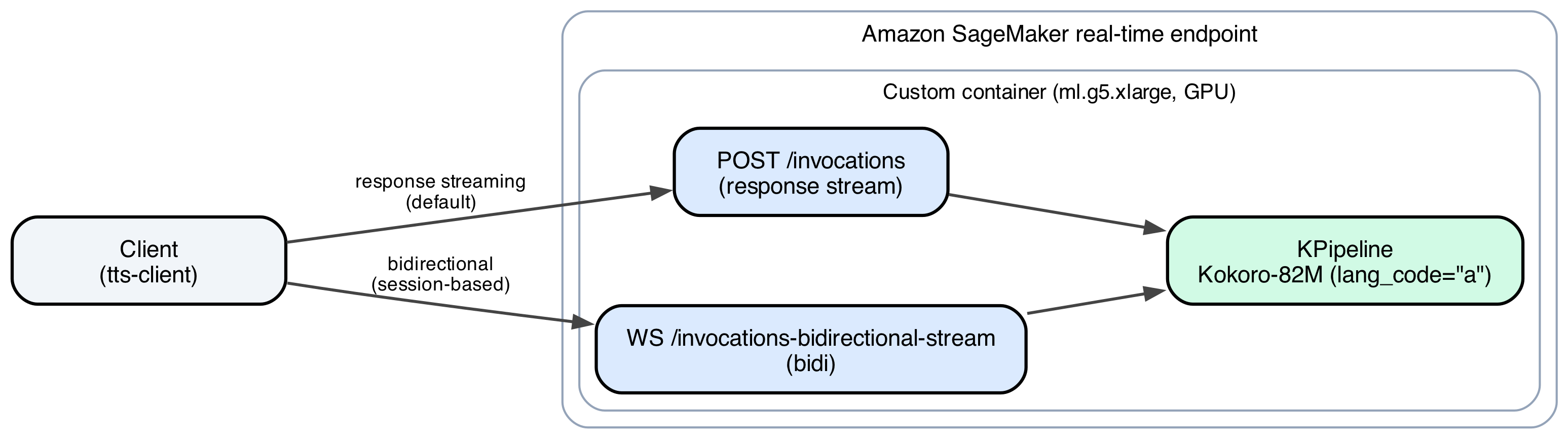
图 1:Kokoro-82M 请求路径,从客户端经过 Amazon SageMaker AI 端点和自定义容器到模型
该容器支持两种传输方式:响应流式传输(InvokeEndpointWithResponseStream),它在音频合成时将其流式返回,因此播放会在话语结束前开始;以及双向流式传输(InvokeEndpointWithBidirectionalStream),它保持一个长期会话打开以处理多条消息。
在自定义容器中运行 Kokoro-82M,而不是放在托管推理工具包后面,正是本文其余部分得以实现的原因。你能控制的容器可以强制执行自己的准入限制,并暴露 Amazon SageMaker AI 已经发布的精确并发信号,而不是把借来的指标硬套到它并非为之构建的工作负载上。部署此端点的 AWS CDK 堆栈只有在模型存在真实、经过测量的 plan 之后才会附加自动扩缩容资源,因此猜测的配置永远不会悄无声息地进入生产环境。本文的其余部分就是那次测量。
先决条件
要跟随本演练,你需要:
- 一个 AWS 账户,具有创建 AWS Identity and Access Management (IAM) 角色、Amazon Simple Storage Service (Amazon S3) 存储桶、Amazon Elastic Container Registry (Amazon ECR) 存储库和 Amazon SageMaker AI 资源的权限。
- 注意:示例容器固定了较早版本的 PyTorch,该版本存在一个已知安全公告(
PYSEC-2026-2286,已在 torch 2.10.0 中修复)。在任何非概念验证用途之前,请审查并升级该固定版本。
- 注意:示例容器固定了较早版本的 PyTorch,该版本存在一个已知安全公告(
- AWS CDK v2,已安装并在你的目标账户和区域中完成引导。
- Python 3.11 或更高版本、 uv,以及用于构建容器镜像的 Docker。
- 一个
ml.g5.xlarge服务配额,在运行本文中的扩容测量之前,至少比你的基线多一个空闲槽位。 - 本文所引用的 GitHub 仓库 中的部署代码。
演练
By the end of this walkthrough, you will have a live Amazon SageMaker AI auto scaling policy for Kokoro-82M, derived entirely from two measurements taken against your own endpoint rather than from a guess.
Deploy the endpoint stacks
The endpoint deploys through three AWS CDK stacks, applied in order: SpeechFoundationStack creates the IAM roles and the Amazon S3 bucket that caches model weights, SpeechModelCacheStack syncs a model’s Hugging Face weights into that bucket once, and SpeechEndpointStack builds the container image, pushes it to Amazon ECR, and creates the Amazon SageMaker AI model, endpoint configuration, and endpoint.
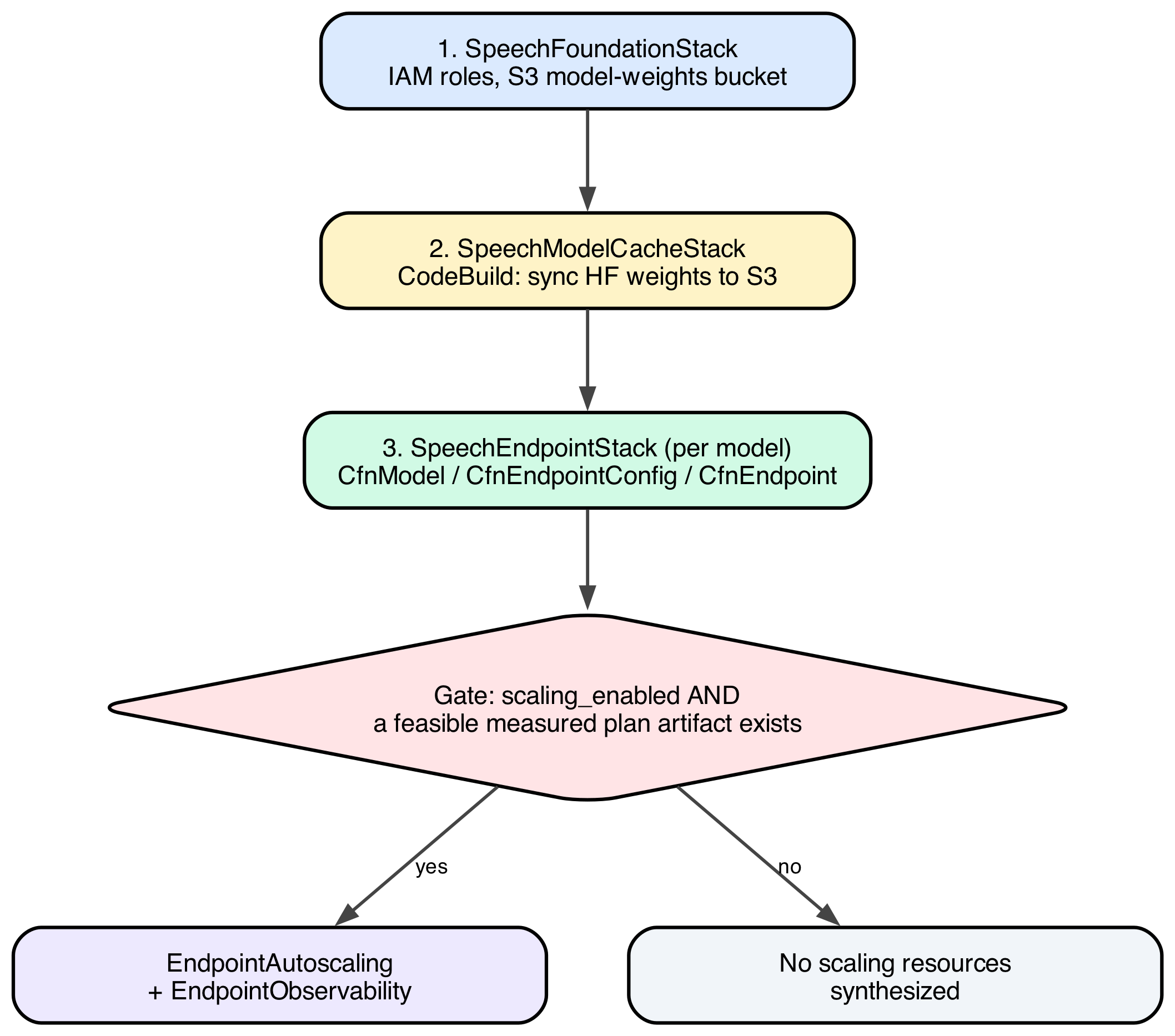
Figure 2: The three AWS CDK stacks and the gate that decides whether auto scaling resources get synthesized
The gate on the third stack keeps a default, unmeasured scaling configuration from reaching production. scaling_enabled is a static flag, true whenever max_instances is configured greater than min_instances, and it says nothing on its own about whether the numbers behind it were ever measured. The stack adds a second, independent check at synthesis time: does a real, feasible plan artifact exist for this model? Only when both conditions hold does the stack synthesize scaling resources: an EndpointAutoscaling construct that wires the scaling policy and alarms, and an EndpointObservability construct that adds the dashboards and alarms used to monitor it. A model with scaling_enabled=True but no measurement behind it gets the same no scaling resources output as one with scaling_enabled=False.
The project’s CLI wraps the three stacks behind a single command, applying them in dependency order:
uv run speech-infra deploy kokoro-82mSpeechModelCacheStack runs an AWS CodeBuild project that syncs the model’s Hugging Face weights into the cached Amazon S3 bucket once. A cold endpoint start doesn’t need to pull them from the internet. Gated by the preceding scaling_enabled check, SpeechEndpointStack builds the container image, pushes it to Amazon ECR, and creates the Amazon SageMaker AI model, endpoint configuration, and endpoint.
The methodology packages as a command-line tool chain, run in a fixed order:

Figure 3: The tool chain, run in order, each command handing an artifact to the next
Step 1: Check for drift
drift runs first, every time, before anything that costs money or holds an endpoint under load. It’s a read-only reconciliation between what’s actually deployed (scalable targets, scaling policies, alarm states) and what the config file says should be deployed. An orphaned policy from an earlier model, or a stopped or canceled qmax or ttotal run, would otherwise silently move capacity mid-measurement and corrupt the numbers being measured.
uv run tts-bench driftA clean result reports no mismatches and exits with a preflight-ok status, clearing the way for qmax. A stopped or canceled qmax or ttotal run is the most common source of a reported mismatch, because it can leave auto scaling frozen on a single instance. uv run tts-bench thaw --endpoint speech-kokoro-82m restores the deployed policy before you proceed, since qmax and ttotal both assume the deployed state matches the config file exactly.
Step 2: Measure Q_max, the concurrency ceiling
Q_max is the largest concurrency, requests queued plus requests executing on one instance, at which a request still reaches first audio byte inside the SLO at the 95th percentile. It’s measured with a closed-loop load ladder: hold a fixed concurrency N exactly, and walk N upward one rung at a time until the SLO breaks. A closed loop avoids coordinated omission, the flaw in fixed-arrival-rate tests where a slowing server makes the client send fewer requests instead of surfacing real queueing delay.
uv run tts-bench qmax --model kokoro-82m --dry-run
uv run tts-bench qmax --model kokoro-82m
--dry-run prints the schedule and a wall-clock estimate with zero AWS calls, so you can budget the roughly 36-minute cost of a live run first. The live command freezes auto scaling and pins capacity to one instance for the duration, restored automatically on exit, so the number it produces is a genuine per-instance ceiling.
The load ladder recorded the following results:
| Concurrency | p95 TTFAB (ms) | Meets 3,000 ms SLO? |
| 1 | 65.4 | yes |
| 5 | 286.2 | yes |
| 10 | 568.5 | yes |
| 20 | 1,129.3 | yes |
| 30 | 1,689.8 | yes |
| 40 | 2,245.0 | yes |
| 50 | 2,805.7 | yes (Q_max) |
| 60 | 3,374.8 | no (breach) |
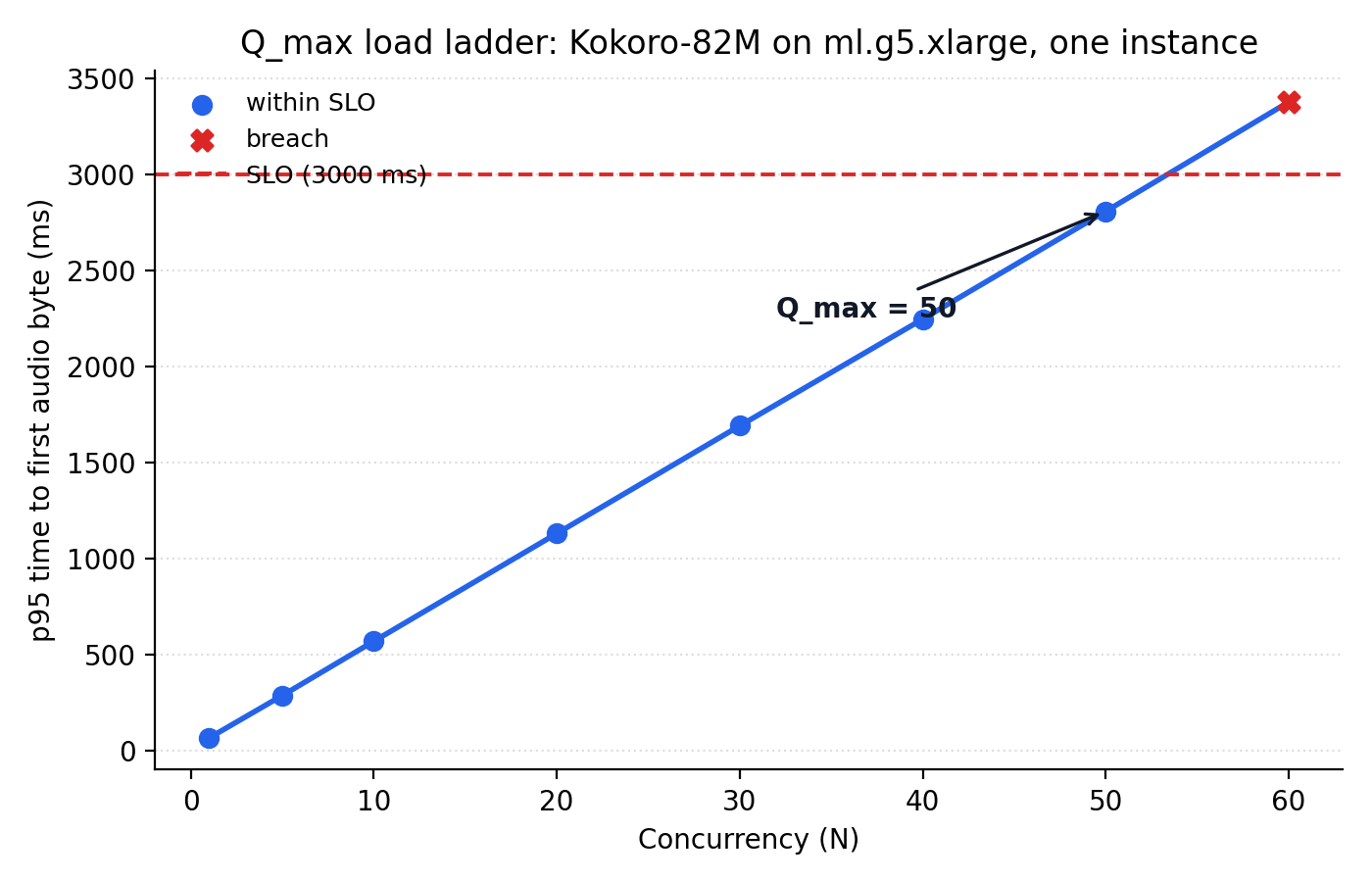
Figure 4: p95 time-to-first-audio-byte against concurrency, with the SLO line and the breach point at concurrency 60
Q_max = 50, and it’s a bracketed result: rung 60 actually crossed the SLO, which makes 50 a real ceiling rather than a lower bound. The same run measured the uncontended service time, the time one request takes with no queueing at all: mean 61.3 ms, p95 66.1 ms. That number drives a second, independent alarm described later in this post.
Step 3: Measure T_total, the real scale-out time
T_total is how long it takes, wall clock, from the moment more capacity is requested to the moment that capacity serves healthy traffic. It’s measured by forcing a scale-out directly, bypassing the deployed policy’s own detection logic, then timestamping every distinguishable stage.
uv run tts-bench ttotal --model kokoro-82m --qmax <qmax-artifact>ttotal requires the qmax artifact as input, since its recovery judgment reads off that ladder’s own measured rungs, and refuses to run against a ladder measured on a different wire transport.
The forced scale-out broke down into eight measured stages:
| Stage | Duration | Share of T_total |
| capacity requested to desired_set | 30.0 s | 9.4% |
| desired_set to instance visible in logs | 180.8 s | 56.5% (dominant) |
| instance visible to container started | 3.7 s | 1.2% |
| container started to framework_init | 0.0 s | 0.0% |
| framework_init to weights_ready | 6.5 s | 2.0% |
| weights_ready to warmup_done | 1.0 s | 0.3% |
| warmup_done to in_service | 20.7 s | 6.5% |
| in_service to traffic recovered | 47.4 s | 14.8% |
| measured total (t_total_s) | 260.2 s | |
| + policy detection lag, bounded (not measured) | 60.0 s | |
| T_total, planned against | 320.2 s |
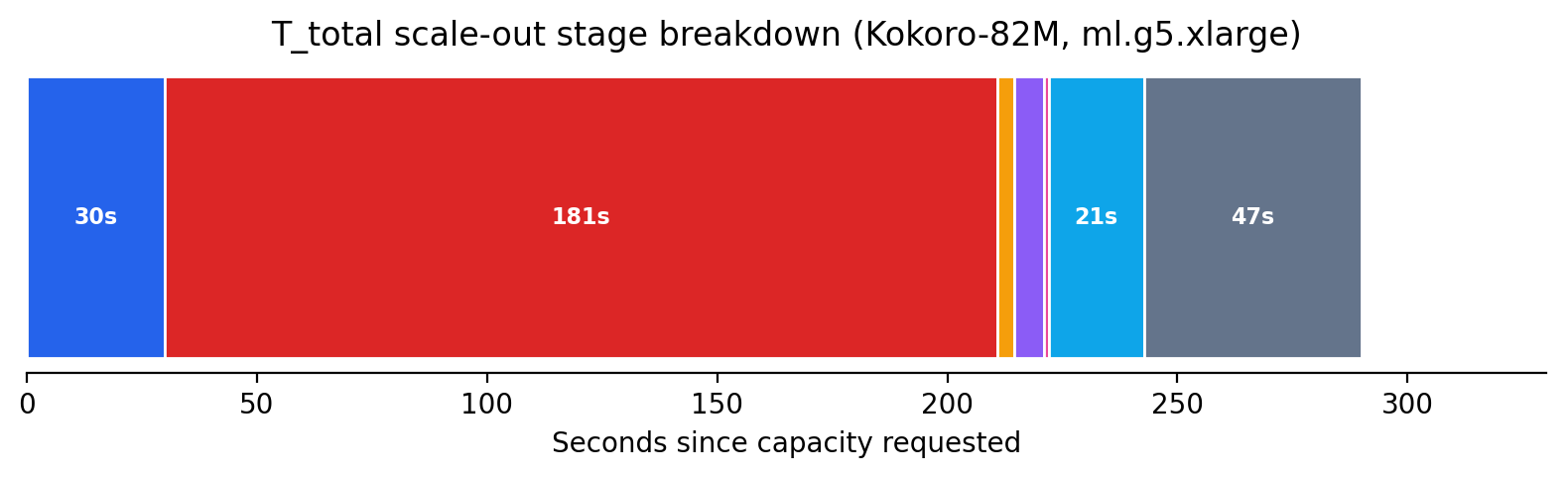
Figure 5: The eight measured stages of a real scale-out, from capacity request to recovered traffic
The dominant stage is Amazon Elastic Compute Cloud (Amazon EC2) instance provisioning plus the container image pull, at 181 seconds, 56 percent of the planned-against total. The highest-impact way to reduce T_total isn’t application code, it’s reducing image size or using warm capacity pools. Everything downstream of “instance visible in logs” is a comparatively small 79 seconds combined.
The 60-second addition on top of the measured 260.2 seconds isn’t measured in this run. It’s bounded from the policy’s own configuration (alarm evaluation period times evaluation periods, plus cooldown), because this run bypassed the policy’s detection logic on purpose to isolate pure provisioning time. plan sizes surge headroom against the full 320.2-second total, because that reaction time is a real part of any production scale-out even though this measurement excluded it.
Step 4: Derive the deployed policy with plan
plan is the only command that never touches AWS. It reads the qmax and ttotal artifacts, combines them with two operator-chosen inputs, an SLO of 3,000 ms p95 TTFAB and a surge ratio of 1.25x (the fleet tolerates traffic growing 25 percent within one scale-out cycle without breaching the SLO), and does the following arithmetic. It then prints a report with a verdict for each finding: ok, warn, or, for a genuinely infeasible plan, stop.
uv run tts-bench plan --qmax <qmax-artifact> --ttotal <ttotal-artifact> --peak-rps 5000The --peak-rps flag (5,000 requests per second here, alongside an assumed trough of 10) sizes the fleet’s instance count. It doesn’t factor into the threshold arithmetic below.
h  = surge_ratio - 1                    = 1.25 - 1 = 0.25

C_scale_max = (1 - h)     x Q_max       = 0.75 x 50   = 37.50
C_scale_min = (1 - 2h)    x Q_max       = 0.50 x 50   = 25.00

W_max = SLO - S_p95                     = 3.000s - 0.066s = 2.934s
C_scale_max is the concurrency at which one more instance is added, below Q_max by the surge fraction h, so the fleet still has queue headroom when it asks for more capacity. C_scale_min is the concurrency at or below which one instance is removed, set at (1 - 2h) of Q_max so scale-in triggers only once load has fallen well below where scale-out would trigger again.
The final deployed configuration, exactly as produced by the tooling:
"kokoro-82m": ModelEndpointConfig(
    model_name="kokoro-82m",
    instance_type="ml.g5.xlarge",
    min_instances=1,             # trough 10 rps; 3 is the smallest safe floor for scale-in
    max_instances=9,             # peak 5000 rps
    scaling_target_value=37.500, # C_scale_max, in Amazon CloudWatch units (ratio measured as 1.0)
    scale_in_threshold=25.000,   # C_scale_min, in Amazon CloudWatch units
    ttfab_slo_ms=3000,
    queue_max_depth=50,          # enforced by the container's own admission gate
    scale_out_cooldown_s=30,     # short: one instance added at a time
    scale_in_cooldown_s=960,     # long: see below
)
The two cooldowns are asymmetric on purpose. Scaling out is cheap to be wrong about: worst case, you paid for one instance you didn’t need for thirty extra seconds. Scaling in isn’t symmetric in cost, since capacity removed and later needed again costs a full T_total (320 seconds) to replace. The scale-in cooldown is set to roughly three times T_total, so a scale-in decision only fires once load has genuinely, sustainedly dropped.
The container’s own admission control separately enforces queue_max_depth=50, equal to Q_max: past that depth, a request is refused immediately with a 503 queue_saturated response rather than left to queue past the point it could meet the SLO. A FirstChunkLatencyP95 alarm, thresholded at 65 ms (the measured p95 service time at concurrency 1), watches service time on an instance already serving, tighter than the end-to-end SLO, which includes queuing.
Two findings from the Kokoro-82M run are worth including, because they’re the tool correctly surfacing a known, accepted trade-off rather than a defect:
surge_survival(warn): HoldingC_scale_max(37.5) againstQ_max(50) puts one instance at 97.4% utilization the moment a scale-out triggers, and a replacement takes a fullT_totalto arrive. The surge ratio reserves extra queue slots, but surviving a real surge is about flow, how fast the queue drains, and there’s little flow headroom left at 97.4 percent utilization.scale_in_safety(warn): Removing one instance from a fleet ofNmultiplies every remaining instance’s concurrency byN / (N-1). Scale-in stays stable only once that ratio holds underC_scale_max / C_scale_min(1.5 here), which requiresN >= 3. With a floor of 1 instance, a scale-in from 2 to 1 lands the survivor at exactlyQ_max, right back at the ceiling that triggers another scale-out. The long cooldown damps this flapping without eliminating it. Raising the floor to 3 would remove it structurally, at the cost of standing capacity during low traffic.
Every qmax or ttotal artifact’s file name encodes the configuration it was measured against, instance type and container image digest condensed into a slug (for example, g5xlarge-8b1b96bc). ttotal and plan both refuse to pair artifacts whose fingerprints disagree. That’s downgradable to a warning with --allow-config-mismatch, but refusal is the default.
Step 5: Confirm the deployed policy with validate
validate is the last command in the chain, and the second one, alongside drift, that never mutates anything. It compares the scaling policy actually deployed against the values in the plan artifact, confirming the two match before you treat the configuration as live.
uv run tts-bench validate --model kokoro-82m --plan <plan-artifact>A clean result confirms scaling_target_value, scale_in_threshold, and both cooldowns on the deployed scalable target match what plan derived. Any mismatch means the deployed policy and the measured plan have drifted apart, and should be resolved before relying on the endpoint’s auto scaling behavior.
Testing and validation
Every qmax, ttotal, and plan artifact referenced in this post is a committed file in the repository, not a one-off local output. The preceding worked example, including every number, is independently reproducible by re-running plan against the two committed measurement files, with zero AWS calls and zero new spend:
$ uv run tts-bench plan --qmax <qmax-artifact> --ttotal <ttotal-artifact> --peak-rps 5000
scaling_target_value : 37.500 (C_scale_max)
scale_in_threshold    : 25.000 (C_scale_min)
surge_survival        : warn
scale_in_safety       : warn
Clean up
To remove the resources created in this walkthrough, tear down the stacks in reverse order with a single command:
uv run speech-infra destroy kokoro-82mspeech-infra destroy removes the Amazon SageMaker AI model, endpoint configuration, endpoint, and any auto scaling or Amazon CloudWatch resources attached to it. It doesn’t empty the Amazon S3 bucket that caches model weights or delete the Amazon ECR repository holding the container image, since both can be shared across models. If you no longer need them, empty and delete the Amazon S3 bucket and remove the Amazon ECR repository manually, since a stored model checkpoint and container image continue to incur small storage charges until removed.
Conclusion
Deploy Kokoro-82M as a custom container on an Amazon SageMaker AI real-time endpoint, and replace guesswork with two measurements taken against the live endpoint: Q_max, the highest concurrency one instance sustains before breaching the SLO, and T_total, how long a real scale-out takes. You derive the scale-out threshold, scale-in threshold, and both cooldowns from those two numbers by arithmetic. Scaling on ConcurrentRequestsPerModel, a native, AWS-published metric, and measuring its unit conversion directly rather than assuming it, is what keeps this configuration tied to real concurrency.
The result is an auto scaling policy where every number traces back to a real measurement against your own endpoint, not an assumption carried over from a different workload shape. That distinction is what turns a config-file guess, one that silently overpays or silently breaches its SLO, into a policy you can defend with a specific concurrency ceiling and a specific scale-out time, both measured, not asserted.
Nothing about this four-number model, SLO and surge ratio chosen, Q_max and T_total measured, the rest derived, is specific to TTS. It generalizes to latency-sensitive, concurrency-bound, real-time Amazon SageMaker AI endpoints. For example, a real-time image-embedding endpoint that holds each request open through a GPU forward pass is bound by the same concurrency ceiling, not by a throughput metric. The same qmax/ttotal/plan chain applies unchanged. The real bottleneck there is concurrent in-flight requests rather than a throughput metric borrowed from a different workload shape. The specific numbers here, Q_max=50 and T_total=320s, are true for Kokoro-82M on ml.g5.xlarge. They will differ for a different model or instance type. The methodology and tooling that produce them don’t. The five-command tool chain, drift, qmax, ttotal, plan, and validate, carries over unchanged to the next model you deploy this way.
Clone the sample repository, then run the five-command chain, drift, qmax, ttotal, plan, and validate, against your own endpoint to produce a measured policy. Review the Amazon SageMaker AI auto scaling documentation to adapt the thresholds to your SLO, and open the SageMaker AI console to watch the policy react to live traffic. If you’d like help building a similar measurement-driven deployment, contact your AWS account team.